[[TOC]]
Developer's Guide to Kubernetes
This is a simple guide for Developers who would like to migrate their locally running application into FTMO Kubernetes cluster and have it running happily ever after.
Before you start tinkering
Check this Illustrated Guide To Kubernetes because it's so cute.
Overview
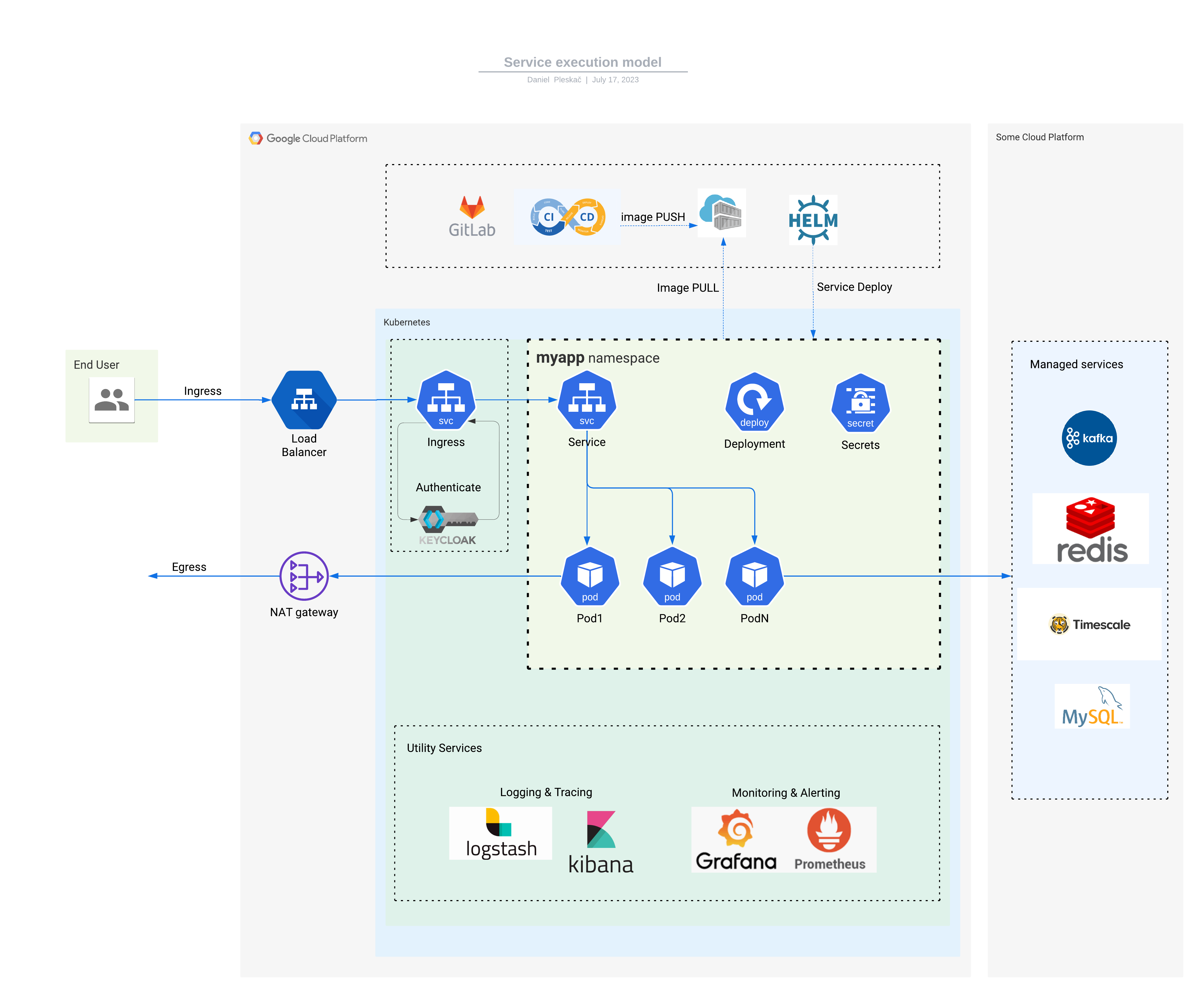
Each application employs various Kubernetes resources, here are some of them described in a nutshell.
For isolation purposes, the kubernetes cluster is segmented into namespaces. At FTMO, the namespace is allocated for either a team or an application.
The application container runs inside a Pod that defines:
- container image:version
- exposed port
- cpu/memory resources requested
- health checks i.e. Readiness & Liveness Probes
Deployment watches over running Pods, allows scaling by creating multiple Pod replicas and takes care of updating container versions (rollout) without service downtime.
Service defines service's network endpoint that can be discovered and accessed by other services. The Service serves incoming traffic and balances it across Pods within Deployment.
For reference, you can check an example server application based on Kotlin. Here's a source code repository.
The application runs in dev cluster, kotlin-spring-example namespace:
(dev:kotlin-spring-example)➜  kubectx dev
Switched to context "dev".
(dev:kotlin-spring-example)➜  kubens kotlin-spring-example
Context "dev" modified.
Active namespace is "kotlin-spring-example".

(dev:kotlin-spring-example)➜  kubectl get all
NAME                                         READY   STATUS    RESTARTS   AGE
pod/kotlin-spring-example-569c54bdf7-khh8b   1/1     Running   0          5d4h

NAME                                             TYPE        CLUSTER-IP      EXTERNAL-IP   PORT(S)    AGE
service/kotlin-spring-example-standard-service   ClusterIP   10.20.114.132   <none>        5000/TCP   135d

NAME                                    READY   UP-TO-DATE   AVAILABLE   AGE
deployment.apps/kotlin-spring-example   1/1     1            1           19d
Other kube resources include configmap, secret, ingress, etc.
Standard service helm chart
As different applications use very similar kubernetes configuration (a set of kubernetes manifests) it'd be inefficient to copy-paste them over and over for each service. Therefore, at FTMO we use helm tool and a Standard Service helm chart. The helm chart combines all kubernetes manifests needed by our services and abstracts away their parameters. Developers just provide a set of input parameters instead of compiling all manifests. The inputs are called values and are in yaml format. For example:
image:
  repository: registry.gitlab.fftrader.cz/devops/examples/kotlin-spring-example
  tag: 64fc62c6
replicaCount: 3
service:
  internalPort: 8080
These values can be applied to the standard-service chart with:
helm upgrade --install \
    --values values.yaml \
    "kotlin-example" \
    ftmo-helm-charts/standard-service
helm takes the input values, renders chart templates, generates a set of manifests and deploys them to kubernetes. A full manifest output can be seen in APPENDIX section.
A list of values can be found here
How do I migrate my service to kube?
- Raise a request for kube infrastructure. DevOps team will create a namespace, integration with gitlab project, user access, managed services, etc
- Setup
kubectlcommand to be able to create and view kubernetes resources. - Create a Gitlab pipeline. It is defined in a .gitlab-ci.yml file in root of your project. As a reference you can use kotlin-example. The pipeline includes a deploy stage that calls helm deploy and references values file
Are there other examples?
Yes, you can get more inspiration (copy-paste) here:
How do I pass input parameters?
You can pass environment variables into your container by adding following section in your values.yml file.
WARNING: DO NOT pass sensitive information like passwords or secrets.
How do I pass sensitive parameters?
The sensitive parameters are passed using SealedSecrets. You create one by following this. Store your SealedSecret to a file in your project, for example .gitlab/sealed-secret.yaml The secret has to be deployed before your service, so add a step into your pipeline before helm install:
How do I reach other services?
Other services in the cluster are accessible from your service at http://<service-name>.<namespace>.svc.cluster.local:<port> URL. You can access services from other namespaces, but not from other clusters.
Can I reach internet?
Yes. The egress traffic is handled by NAT gateway, source IP address of your Pods on the Internet is:
| environment | IP address |
|---|---|
| dev | 34.141.94.228 |
| stage | 35.234.69.123 |
| prod | 34.89.131.252 |
| prod-us-east4 | 34.86.130.85 |
How do I reach my service?
By default, your service is only reachable within the cluster. If you want to reach it from outside, you add ingress configuration into your values.yml. This kotlin ingress example does few things:
- creates ingress at
https://kong.dev.fftrader.cz/kotlin-example - connects the ingress with service resource
- manages https certificate (via letsencrypt-prod-kong)
- whitelists incoming IP to FTMO office (195.39.45.226)
- sets up rate-limiting to make it resilient
ingress:
  ingressClassName: kong
  enabled: true
  path: "/kotlin-example"
  tls:
    enabled: true
    secretName: "kotlin-example"
  annotations:
    cert-manager.io/cluster-issuer: letsencrypt-prod-kong
    konghq.com/https-redirect-status-code: "308"
    konghq.com/plugins: ip-restriction,rate-limiting-1
    konghq.com/protocols: https
    konghq.com/strip-path: "true"
    kubernetes.io/tls-acme: "true"

kong:
  plugins:
  - name: ip-restriction
    route: /kotlin-example
    config:
      allow:
      - 195.39.45.226
    annotations:
      kubernetes.io/ingress.class: kong
How do I reach my service through ch1 (internal Kong)
You need to have port-forward permissions on the kong-internal namespace.
Then, you run the command on your laptop:
8080 and forwards it to HTTP port of kong-internal. Now you can reach your service <path> via curl http://localhost:8080/<path> in other terminal
How do I connect to managed services like SQL, Redis, Timescale, etc.
Tell your DevOps team what managed services you plan to use, so that required infrastructure can be created. Credentials are stored in a secret called \<your-service-name>-extra-envs, example is here. Once you add following section to your values.yaml, all secret items will be exposed as environment variables in your service container:
How do I scale my service?
Horizontal Pod Autoscaler takes care of pod scaling up & down. For cpu-based autoscaling you can use following chart values:
For memory-based scaling use:
hpa2:
  enabled: true
  minReplicas: 1
  maxReplicas: 3
  metrics:
    - type: Resource
      resource:
        name: memory
        target:
          type: Utilization
          averageUtilization: 80
You can combine cpu & memory criteria as well:
hpa2:
  enabled: true
  minReplicas: 1
  maxReplicas: 3
  metrics:
    - type: Resource
      resource:
      name: memory
      target:
        type: Utilization
        averageUtilization: 80
    - type: Resource
      resource:
      name: cpu
      target:
        type: Utilization
        averageUtilization: 90
How do I log my service?
Elastic search technology is used to collect and store logs from your service. We aim to standardize our logging outputs by using Elastic Common Schema (ECS).
To enable your service logs:
* install language specific ECS library
* enable logging by adding following annotations to your values.yaml:
podAnnotations:
  # enables logging
  co.elastic.logs/enabled: "true"
  # enables ECS
  co.elastic.logs/json.add_error_key: "true"
  co.elastic.logs/json.expand_keys: "true"
  co.elastic.logs/json.overwrite_keys: "true"
  co.elastic.logs/json.keys_under_root: "true"
Note that annotations mentioned below will not work with new logging solution, please do not use them anymore
The logs are stored in logs-<environment>-default datastream and can be viewed in kibana.
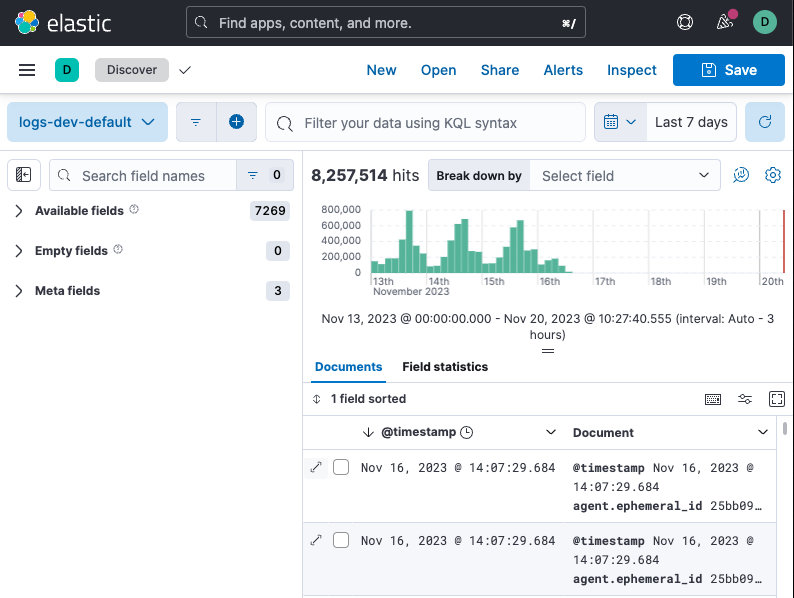
Optionally, you can ask DevOps team to create a dedicated datastream for your namespace if you wish to separate your service log streams.
Individual log messages contain: * kubernetes metadata containing info about node, deployment, pod, labels, annotations, etc...
The original logs can be enhanced or filtered by processors before being shipped to the elastic cluster. Here's a processor's documentation and how to write their pod annotations.
Few processor examples:
# add my project identifier
co.elastic.logs/processors.add_fields.target: "project-info"
co.elastic.logs/processors.add_fields.fields.id: "project-X"

# rate-limit
co.elastic.logs/processors.rate_limit.limit: "100/m"

# filter metrics requests
co.elastic.logs/processors.drop_event.when.regexp.json.message: "^GET /metrics HTTP/[0-9]\.[0-9].*"

# filter successful liveness probes
co.elastic.logs/processors.drop_event.when.and.0.regexp.json.message: "^GET /liveness"
co.elastic.logs/processors.drop_event.when.and.1.equals.json.http.response.code: "200"
More info about logging infrastructure can be found here
APPENDIX
Manifests generated by helm
---
# Source: standard-service/templates/service.yaml
apiVersion: v1
kind: Service
metadata:
  name: kotlin-example-standard-service
  annotations:
  labels:
    track: "stable"
    app: kotlin-example
    chart: "standard-service-0.24.1"
    release: kotlin-example
    heritage: Helm
    app.kubernetes.io/name: kotlin-example
    helm.sh/chart: "standard-service-0.24.1"
    app.kubernetes.io/managed-by: Helm
    app.kubernetes.io/instance: kotlin-example
spec:
  type: ClusterIP
  ports:
  - port: 5000
    targetPort: 8080
    protocol: TCP
    name: web
  selector:
    app: kotlin-example
    tier: "web"
    track: "stable"
---
# Source: standard-service/templates/deployment.yaml
apiVersion: apps/v1
kind: Deployment
metadata:
  name: kotlin-example
  annotations:


  labels:
    track: "stable"
    tier: "web"
    app: kotlin-example
    chart: "standard-service-0.24.1"
    release: kotlin-example
    heritage: Helm
    app.kubernetes.io/name: kotlin-example
    helm.sh/chart: "standard-service-0.24.1"
    app.kubernetes.io/managed-by: Helm
    app.kubernetes.io/instance: kotlin-example
spec:
  selector:
    matchLabels:
      app: kotlin-example
      track: "stable"
      tier: "web"
      release: kotlin-example
  replicas: 3
  template:
    metadata:
      annotations:
        checksum/application-secrets: ""


      labels:
        track: "stable"
        tier: "web"
        app: kotlin-example
        chart: "standard-service-0.24.1"
        release: kotlin-example
        heritage: Helm
        app.kubernetes.io/name: kotlin-example
        helm.sh/chart: "standard-service-0.24.1"
        app.kubernetes.io/managed-by: Helm
        app.kubernetes.io/instance: kotlin-example
    spec:
      #######################################################################################################
      # Pod Security Context
      # See: https://gitlab.fftrader.cz/devops/charts/standard-service/-/blob/master/docs/security_context.md
      #######################################################################################################
      # Do not mount the default Service account token to the Pod
      # See https://hackersvanguard.com/abuse-kubernetes-with-the-automountserviceaccounttoken/
      automountServiceAccountToken: false
      imagePullSecrets:
          - name: gitlab-registry
      topologySpreadConstraints:
        - maxSkew: 1
          topologyKey: kubernetes.io/hostname
          whenUnsatisfiable: ScheduleAnyway
          labelSelector:
            matchLabels:
              track: "stable"
              tier: "web"
              app: kotlin-example
              chart: "standard-service-0.24.1"
              release: kotlin-example
              heritage: Helm
              app.kubernetes.io/name: kotlin-example
              helm.sh/chart: "standard-service-0.24.1"
              app.kubernetes.io/managed-by: Helm
              app.kubernetes.io/instance: kotlin-example
### INIT CONTAINERS
      containers:
### STANDARD CONTAINER
      - name: standard-service
        image: registry.gitlab.fftrader.cz/devops/examples/kotlin-spring-example:64fc62c6
        #######################################################################################################
        # Container Security Context
        # See: https://gitlab.fftrader.cz/devops/charts/standard-service/-/blob/master/docs/security_context.md
        #######################################################################################################
        imagePullPolicy:
        volumeMounts:
        # If root filesystem read-only, we need a writable /tmp
        - name: tmp
          mountPath: /tmp
        env:
          - name: DATABASE_URL
            value:
          - name: GITLAB_ENVIRONMENT_NAME
            value:
          - name: GITLAB_ENVIRONMENT_URL
            value:
        ports:
        - name: "web"
          containerPort: 8080
        livenessProbe:
          httpGet:
            path: /
            scheme: HTTP
            port: 8080
          initialDelaySeconds: 15
          timeoutSeconds: 15
          periodSeconds: 10
          successThreshold: 1
          failureThreshold: 3
        readinessProbe:
          httpGet:
            path: /
            scheme: HTTP
            port: 8080
          initialDelaySeconds: 5
          timeoutSeconds: 3
          periodSeconds: 10
          successThreshold: 1
          failureThreshold: 3
        resources:
          limits:
            cpu: 200m
            memory: 256Mi
          requests:
            cpu: 100m
            memory: 128Mi
### VOLUMES DEFINITION
      volumes:
      # If root filesystem read-only, we need a writable /tmp
      - name: tmp
        emptyDir: {}
---
# Source: standard-service/templates/ingress.yaml
apiVersion: networking.k8s.io/v1
kind: Ingress
metadata:
  name: kotlin-example-standard-service
  labels:
    app: kotlin-example
    chart: "standard-service-0.24.1"
    release: kotlin-example
    heritage: Helm
    app.kubernetes.io/name: kotlin-example
    helm.sh/chart: "standard-service-0.24.1"
    app.kubernetes.io/managed-by: Helm
    app.kubernetes.io/instance: kotlin-example
  annotations:
    kubernetes.io/ingress.class: "nginx"
    kubernetes.io/tls-acme: "true"
spec:
  tls:
  - hosts:
    - "my.host.com"
    secretName: kotlin-example-standard-service-tls
  rules:
  - host: "my.host.com"
    http:
      &httpRule
      paths:
      - path: "/"
        pathType: Prefix
        backend:
          service:
            name: kotlin-example-standard-service
            port:
              number: 5000