Landing Zone
Gitlab Setup
CFF=Cloud Foundation Fabric
We needed to mirror data from the official CFF repository so we created the CFF Mirror gitlab project that is read-only code and tags from upstream. CFF Fast Framework which we use to deploy the landing zone recommends fork-and-own hence the need for the CFF Fork project. Lastly, there is the CFF Deploy repository which uses ftmo tags from Fork to deploy FAST stages(0,1).
Repositories
Picture shows overview of repositories and their relationships.
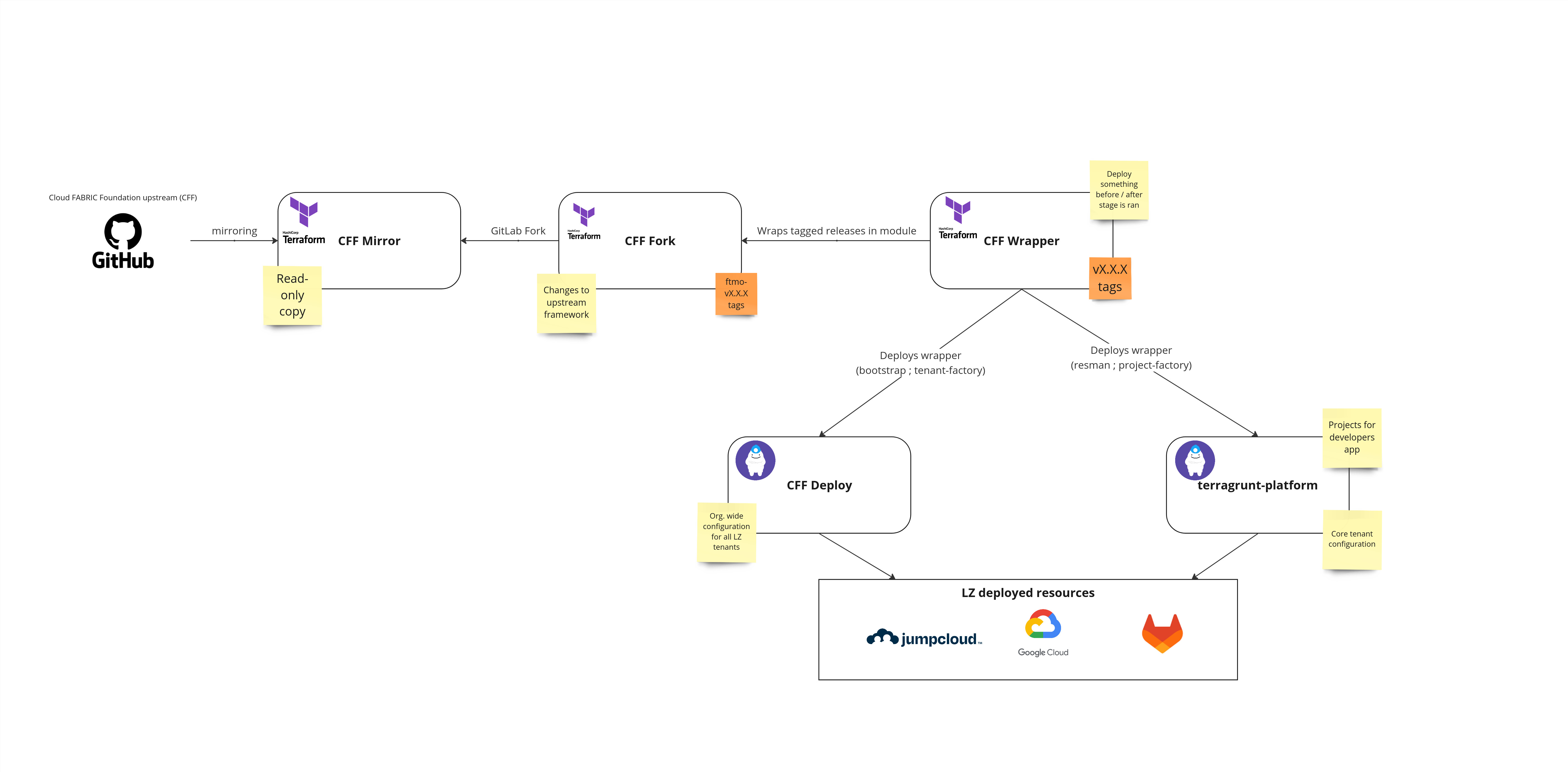
- CFF Mirror
- read-only copy of upstream CFF Repository
- tags can be used for CFF modules that do not need any forking
- CFF Fork
- master is always based on some tag from the upstream
- contains changes to FAST needed
- contains ftmo releases like
ftmo-v33.0.0 - all releases follow semantic versioning
- CFF Wrapper
- wraps CFF Fork modules to module and contains extra resources
- used for simpler modifications without changes to fork - when we need to create resource before applying the stage or after
- uses semantic versioning - v1.0.0
- CFF Deploy
- calls CFF wrapper modules via Terragrunt.
- contains dev Landing Zone and production Landing Zone
- terragrunt-platform
- calls CFF wrapper modules via Terragrunt.
- contains core tenant resman and project-factory infrastructure
The flow of deploying new changes from upstream into the deploy repository
- Make a new orphan branch in FORK git checkout --orphan feat/vx.y.z-from-upstream
- Run git fetch git@gitlab.fftrader.cz:devops/cloud-foundation-fabric-mirror <tag_from_mirror>
- Run git merge FETCH_HEAD
- Make a Merge Request to master the changes
- Deploy new tag with naming ftmo-vX.Y.Z
- Use a new tag in the deploy repository
CI/CD
Jobs
- For pipeline, Terragrunt with Terraguardian is used, same as in terragrunt-platform and terragrunt-workload
- Extra Gitlab jobs are in pre-script/ or gitlab/ folders in repositories. They execute scripts needed for job (getting token, downloading tfvars from buckets...)
Service accounts
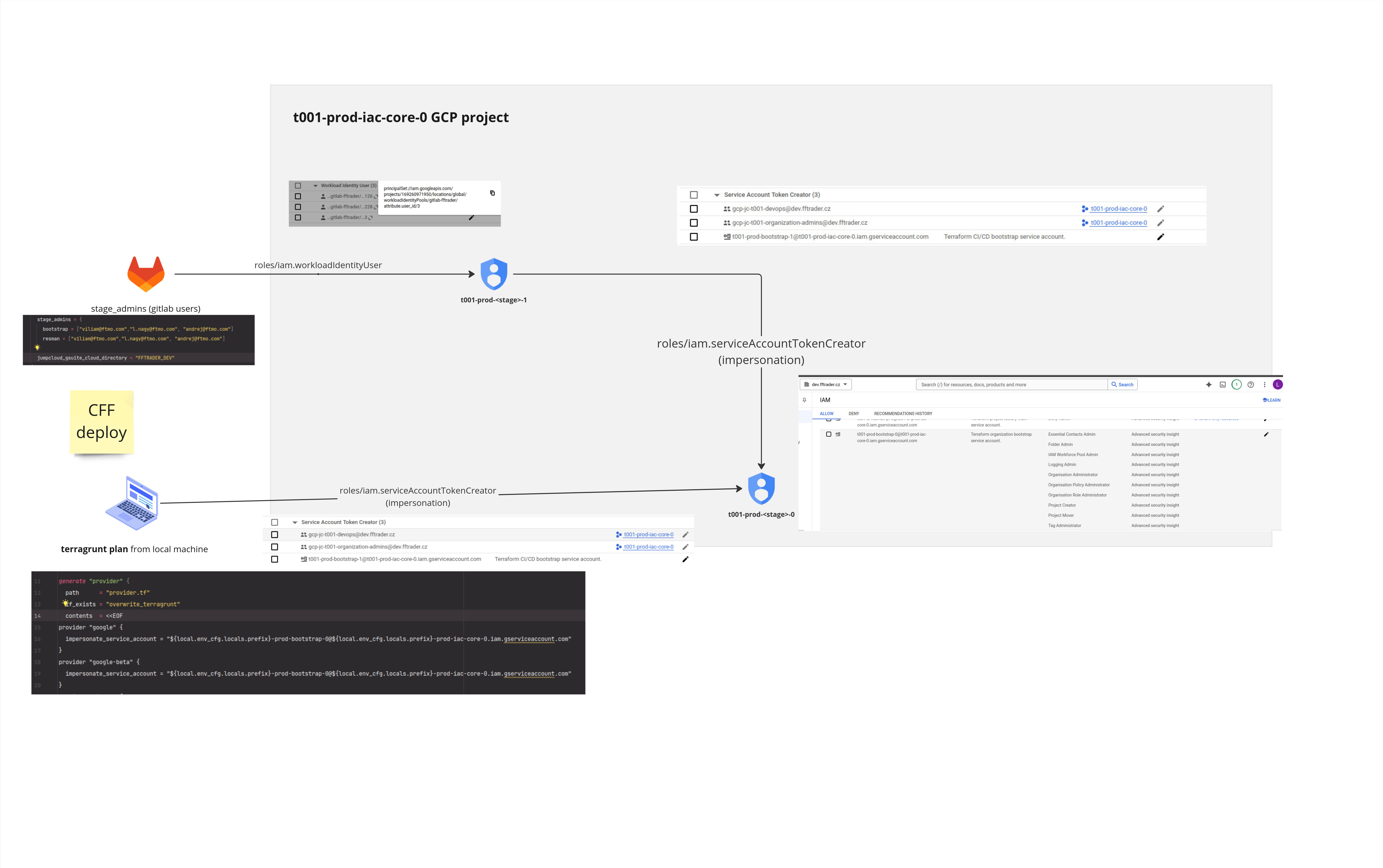
- No static service account keys are used. Workload Identity Federation + Service account impersonation.
- FAST framework creates automation service accounts with IAM roles for stage (bootstrap-0)
- We create an extra account (bootstrap-1), which can impersonate a FAST-provided automation account (bootstrap-0).
- stage_admins variable defines Gitlab identities who can run jobs. Stored in CFF deploy / terragrunt-platform
- From the local machine, we impersonate (bootstrap-0) directly, thanks to org. admins group
- We grant gitlab users Workload Identity User IAM to bootstrap-1 account, so we call it from the GitLab pipeline.
Picture illustrates the impersonation flow.
Sharing tfvars via outputs bucket
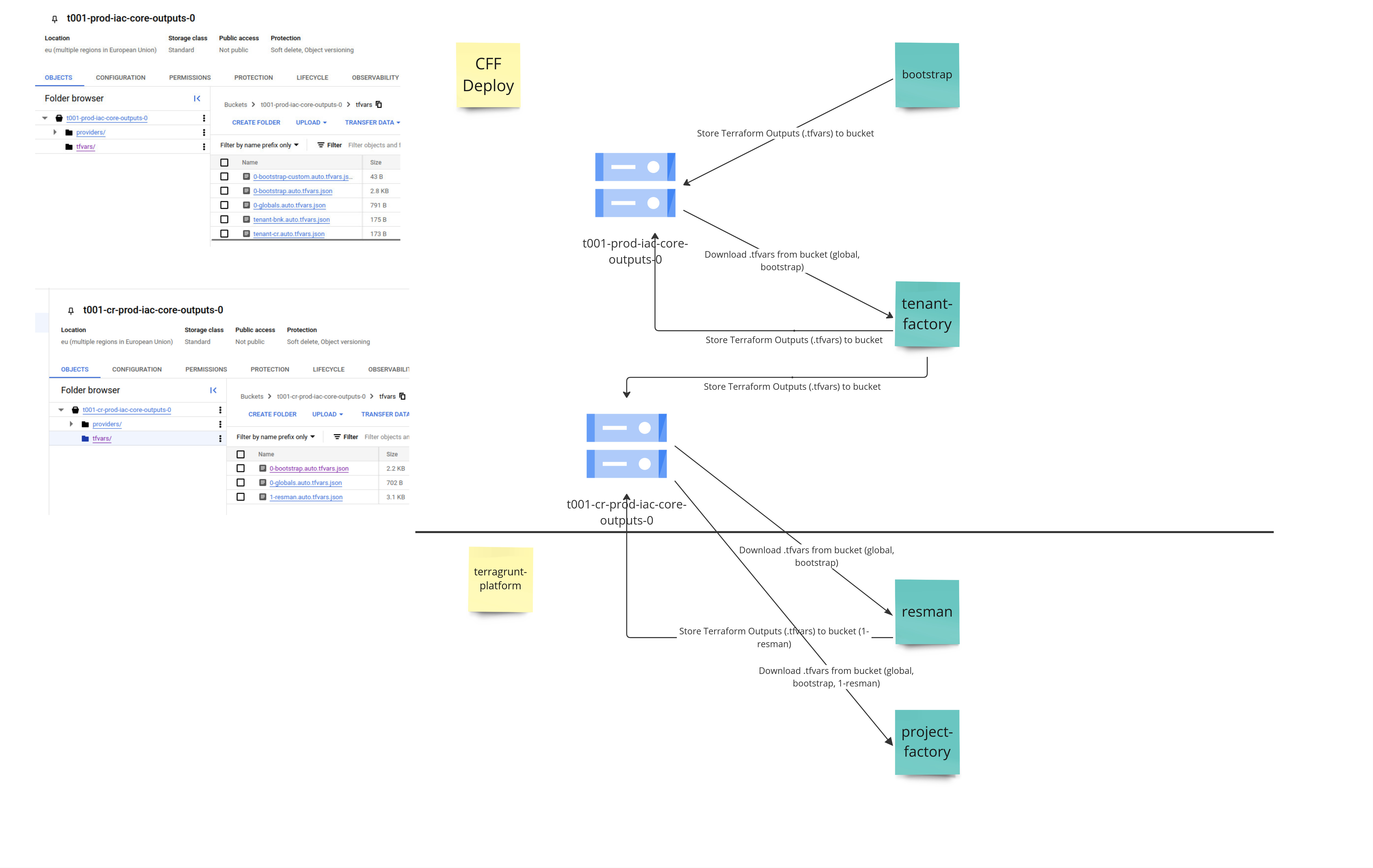
- Stages creates *.tfvars and stores in outputs bucket
- Subsequent stages have to have these files present, when running Terragrunt
- Files are downloaded during CI job
- For local run, you can run the same script as CI job:
- CFF deploy - pre-script/dev.yaml or pre-script/prod.yaml
- terragrunt-platform - gitlab/landing-zone-prep.yaml
We couldn't use Terragrunt features for sharing data between dependencies. It's because each stage runs with different account and Terragrunt expects usage of single account for all dependencies. This way, it uses FAST framework way of sharing the outputs.
On the picture, where does each stage store it's tfvars and which subsequent stages downloads them
Stages
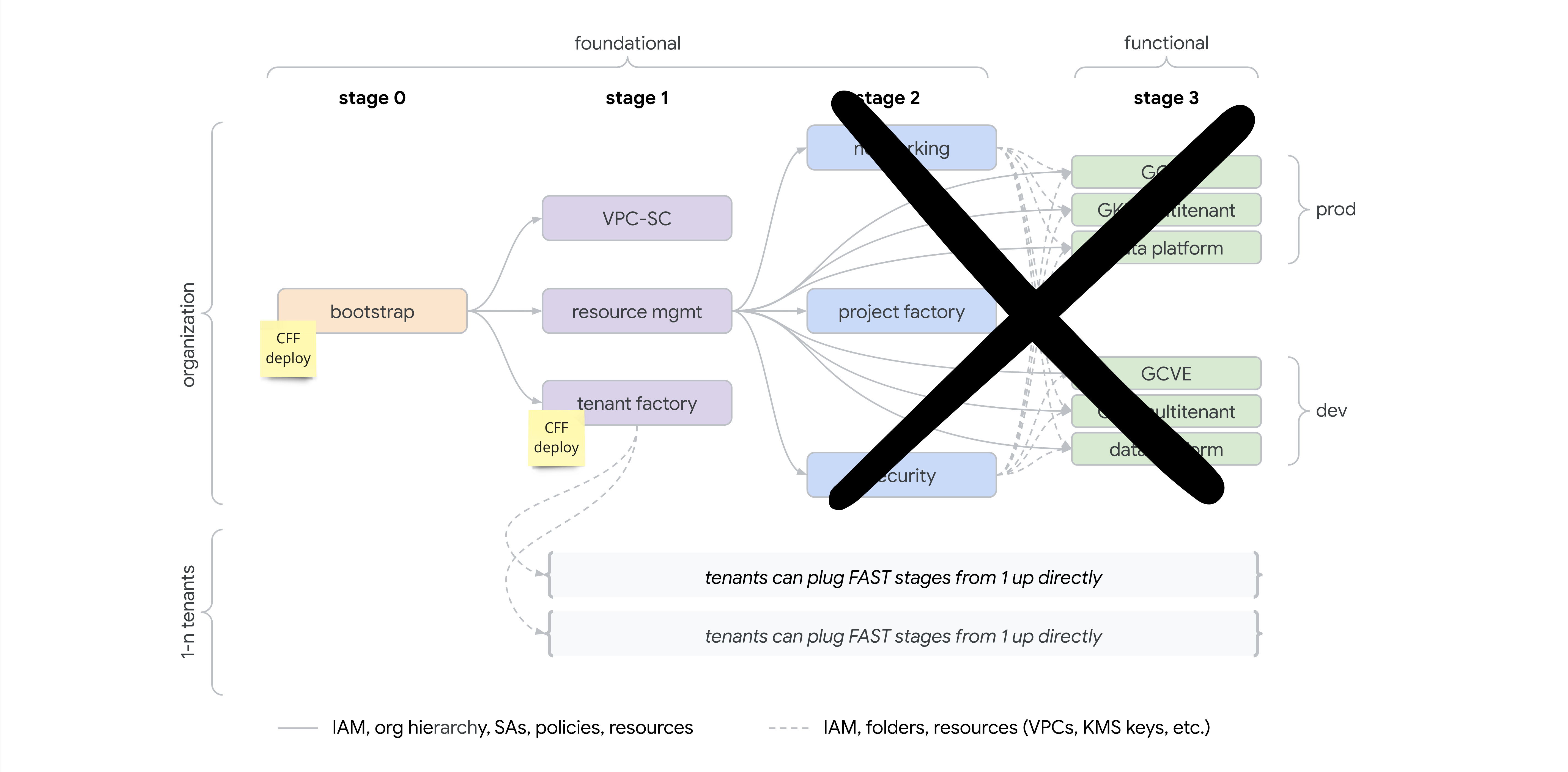
We use only some stages from FAST framework.
For org. wide resources - we use 0-bootstrap and 1-tenant-factory. Later stages are tenant-specific from this point, therefore they are in different repository.
Core tenant, it's terragrunt-platform repository. In the future, where more tenant will be needed, these repositories can be anywhere and it's up to tenant if they use FAST framework or something else.
Org. wide stages
Core tenant stages
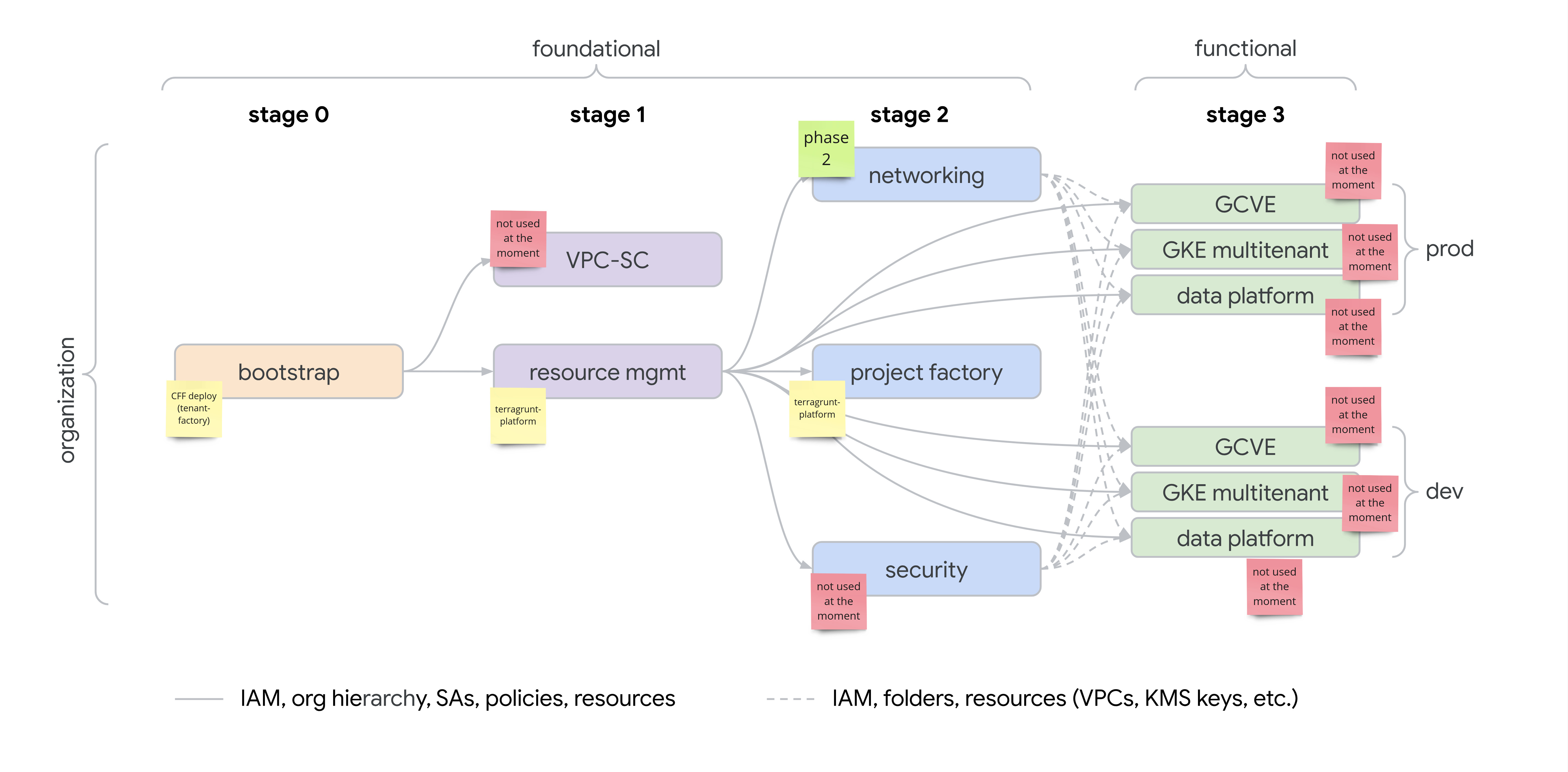
0-bootstrap
TODO
1-tenant-factory
- prepares "tenant" for different FTMO subsidiaries, isolated from each other.
- tenant have its own bootstrap GCP project, containing Terraform state files for further stages.
- global org. admins still have access to "tenant" resources (they are admin principal).
The logic of passing input to tenant-factory module is in common/1-tenant-factory.hcl, shared by dev and production Landing Zone.
Adding new tenant
From start, we anticipate single tenant - CR (Core), but we are ready for more. To demonstrate it, dev landing zone has second tenant - BNK (Bank).
Example folder hierarchy in CFF Deploy repository - creates 2 tenants cr and bnk:
tenants folder, where each tenant has its own .hcl file.
It must contain at least these locals:
- tenant_prefix - prefix of tenant (max 4 characters), used in project names, service accounts, etc.
- cfg - configuration of tenant - human description, tenant-scoped administration groups, etc. Full scope of configuration is here
IAM Design for GCP Projects
Requirements
- Prevent developers from escalating privileges beyond their assigned roles.
- Ensure developers do not lose access to the project.
- Do not break the Fabric structure, such as resource tags, which are critical for cross-project integrations and consistent project governance.
- Restrict the Owner group to only IAM granting via delegated authority, without full control over the project resources.
- Keep developers within allowed Landing Zone API scope
This is achieved by usage of custom roles that are based on the granular google roles for each api with exclusion of some dangerous/unnneded permissions.
Roles Hierarchy
Groups defined (from RFC 6):
- Browser: Minimal read-only access.
- Viewer: Read-only with slightly more access than Browser.
- Editor: Modify resources but no IAM or project control.
- Owner: Restricted to IAM delegation, cannot modify project resources directly.
Implementation of custom IAM roles
Git repository for custom roles Landing Zone Custom Roles Custom IAM roles are applied on project folder (ck-0 in example below)
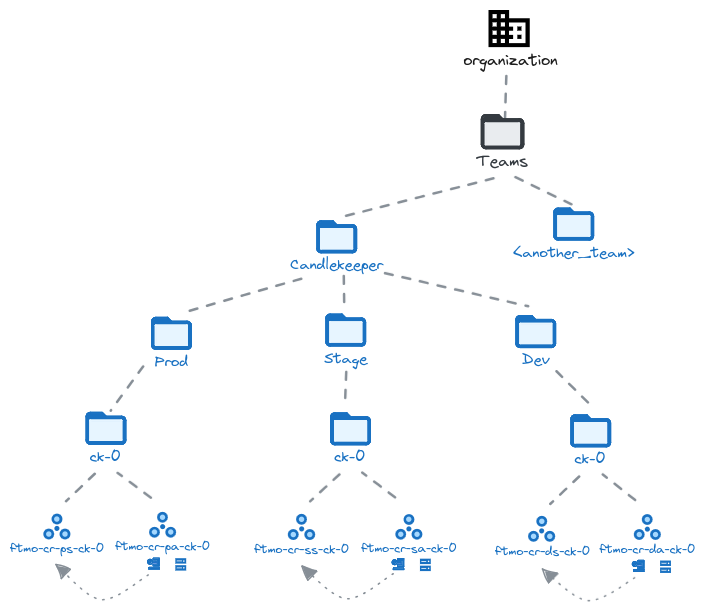
We have 6 custom roles for each group defined browser-1 -> browser-5, this is due to size limitation of each custom role.
Each custom role is based on google granular roles like roles/pubsub.viewer
Custom roles uses permission exclusion to remove dangerous permissions.
Example of custom role definition
  - id: viewer_lz_0
    title: 'LZ viewer 0'
    description: 'Predefined LZ Viewer 0'
    stage: BETA
    source:
      - roles/browser # allow getIamPolicy on projects for better UX
      - roles/monitoring.viewer
      - roles/logging.viewer
      - roles/pubsub.viewer
      - roles/cloudscheduler.viewer
      - roles/storage.objectViewer
      - roles/oauthconfig.viewer
      - roles/serviceusage.serviceUsageConsumer
      - roles/iam.serviceAccountViewer
    include:
      - '*'
    exclude:
      - '*.setIamPolicy'
      - 'apikeys.keys.get'
      - 'iam.serviceAccountKeys.get'
      - 'clientauthconfig.clients.get'
    append:
      - 'storage.buckets.list'