PostgreSQL user administration
Concepts
PostgreSQL uses Role-based Access Controls (RBAC) for permission management. The primary entity is role, which represent both set of permissions and/or user account with credentials. We decouple the authorization (what can role do) from authentication (who is connecting) with 2 roles - application roles (authorization) and service account / user account roles (authentication). Application role has privileges over objects, but it's not possible to login as application role. On the other hand, service account / user account role can log in with password, but it doesn't have any privileges assigned directly. These roles are members of application roles. Picture below illustrates the idea.
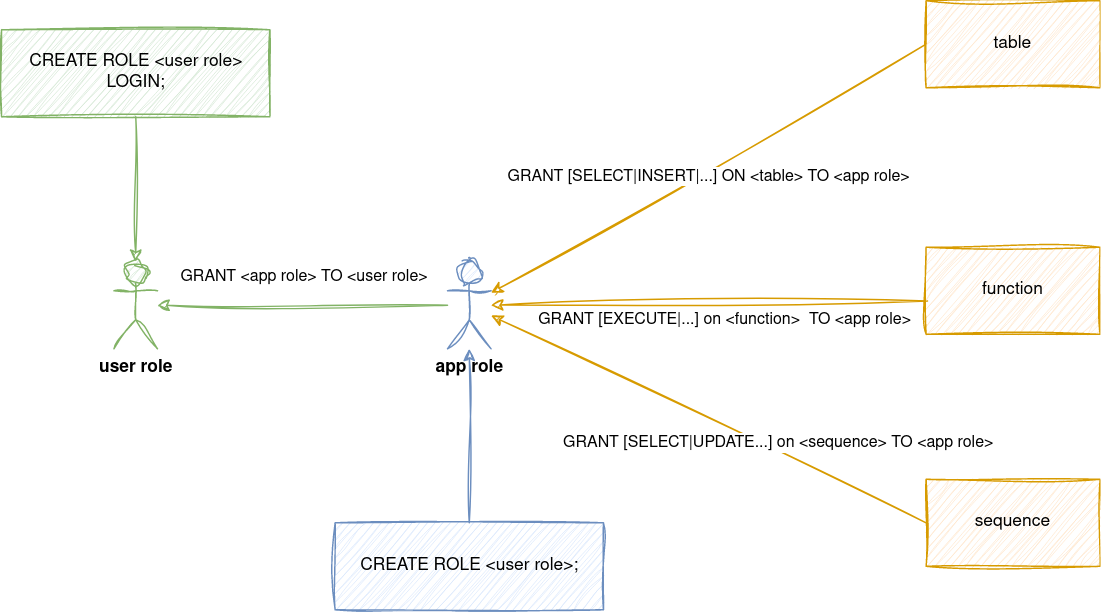
Another important concept to understand is owner of objects. When role calls CREATE operation, it automatically becomes an owner of given object.
This makes it sort of "superuser" of object - role has all the privileges over created object. It can reassign the ownership to different role and only owner can call DROP over the object.
We want to avoid having objects directly owned by user / service account role, because we can't limit the users what they can do with the object.
It's also difficult to assign default privileges for future objects - these depend on the owner of created object and usually, we don't know all the users that will have access to database in advance.
To solve this, owner of object is always application role. Users can't have CREATE privileges directly. There are cases, when service / user account role needs to have CREATE or DROP privileges.
Typically, these are migration accounts, executing creation of tables, functions, etc. To satisfy this use case, migration account logins with its credentials, however right after login SET ROLE <app role name> is called - effectively impersonating the application role. In Terraform, this is enforced through assume_role attribute.
Account can have only single assume_role attribute. When the user has CREATE privileges over multiple schemas, user must call SET ROLE <app role> to appropriate schema.
How to create new database and add service/user accounts to it?
You will work with 2 repositories - projects for database and service account creation and user-access for user accounts
- Decide whether the database will be in shared Cloud SQL instances or dedicated ones.
- Create application roles for new database. This will prepare RO, RW and full-access roles
- Create service accounts with binding to app roles. In case of migration accounts, assume_role on full-access role should be filled in.
- After applying, check the Terraform output. It contains reference to application role, which is later used in user-access repository.
- Create user account in user-access repo. If the user already exists on instance, append newly created
app_roleto the list of existing roles. - User account needs to have
roles/cloudsql.clientIAM role to use Cloud SQL Auth proxy. This is currently handled together inmysql.tfwhere the list of MySQL users is concat with PostgreSQL users. If you create new dedicated cluster, the list needs to be updated to include these users. - After applying, the generated credentials are part of Terraform output. Output is sensitive - to see it, you have to use
terraform output -json - Send credentials to user through secure channel (Bitwarden Send). Cloud SQL Auth proxy is a way for users to connect - we have a guide for developers on how to connect.
How to setup DB_DSN for application?
DB_DSN can be constructed right in the Terraform. It's recommended to also include search_path parameter. That way, app will create tables in correct schema and won't fall back to public schema, if non-fully qualified table name is used.
For example, it can look like this:
tdi-consumer = {
  DB_DSN = format("postgresql://%s:%s@%s/%s?search_path=%s",
    module.stage-tbi-tdi-pgsql-service-accounts["tdi-api"].username,
    module.stage-tbi-tdi-pgsql-service-accounts["tdi-api"].password,
    data.google_sql_database_instance.tbi_tdi_dedicated_instances["stage"].private_ip_address,
    "tdi",
    "tdi",
  )
}
How to remove role membership from account?
- Login as
postgresuser to Cloud SQL database (via Cloud SQL Auth proxy andpsqlclient). Credentials for shared clusters are stored in Bitwarden. Otherwise, just set the password via Google Cloud console - List existing users with
\du+command. This will list the roles and their membership in other roles.
fftrader-idp-team-idp-keycloak-dev2=> \du+

                                                                                                   List of roles
                    Role name                    |                         Attributes                         |                                      Member of                                       | Description
-------------------------------------------------+------------------------------------------------------------+--------------------------------------------------------------------------------------+-------------
 andrej                                          | Create role, Create DB                                     | {cloudsqlsuperuser,fftrader-idp-team-idp-keycloak}                                   |
- Remove the role grant with
REVOKE. Use quotes to escape special characters (such as.or-)
How to restore PostgreSQL from CloudSQL pg_dump
- If the database exists and is not empty, it needs to be emptied first. Check who owns the tables with
/d. Then either assume users role viatf-runneror get users pwd from k8s and dodrop owned by db_user_name cascade; - Use
Importfeature on new database - specify dump, new database and usertf-runneras importer. This user has superadmin and is a member of *_full_access application role - After import is done, the imported objects in database are owned by
tf-runnerinstead of application role. - Login as
tf-runnerto database viapsql -U tf-runner 127.0.0.1 <db name>. Password is stored in Terraform state. In this case we pull it like this:terraform output pgsql_tf-runner-cred - Verify if the
tf-runnerowns the imported objects like this
select
    nsp.nspname as SchemaName
     ,cls.relname as ObjectName
     ,rol.rolname as ObjectOwner
     ,case cls.relkind
          when 'r' then 'TABLE'
          when 'm' then 'MATERIALIZED_VIEW'
          when 'i' then 'INDEX'
          when 'S' then 'SEQUENCE'
          when 'v' then 'VIEW'
          when 'c' then 'TYPE'
          else cls.relkind::text
    end as ObjectType
from pg_class cls
         join pg_roles rol
              on rol.oid = cls.relowner
         join pg_namespace nsp
              on nsp.oid = cls.relnamespace
where nsp.nspname not in ('information_schema', 'pg_catalog')
  and nsp.nspname not like 'pg_toast%'
  and rol.rolname = 'tf-runner'
order by nsp.nspname, cls.relname;
REASSIGN OWNED BY "tf-runner" TO "<application role with _full_access>";
6. You can use query from previous step to verify if the ownership was transfered.
References
- pgsql_service_accounts.tf - full example of application roles + service accounts
- tbi.tf - example of dedicated CloudSQL + filling of
DB_DSNfrom created service accounts - pgsql.tf - full example of user accounts
Migrating data between instances
I tried migrating 1 database from 1 cluster to another instance with empty database. I didn't have good experience with GUI Import / Export, but I was successful with pg_dump and pg_restore.
The advantage is that I had more control on who is the owner of imported tables, if it should be done in 1 transaction, etc... I followed https://cloud.google.com/sql/docs/postgres/import-export/import-export-dmp#external-server but modified it like this.
For backup, connect via Cloud SQL Auth proxy to DB, with user that has full_access role, for example:
pg_dump -h 127.0.0.1 -U tbl-migrate \
--schema=tbl \
--no-privileges \
--format=custom \
--no-owner \
tbl > tbl-shared-stage.dmp
--schema- schema is owned by tf-runner, not migrate user - using it will prevent dumping the restoration command for schema, which would fail on restoration--no-privileges- don't try to import grant/revoke--format=custom- uses binary format, which gives us fine grain access to restoration process + compression--no-owner- don't include owner from src DB, as it might be different from destination DB.
For restoring, I reconnect Cloud SQL Auth proxy to new instance and call pg_restore like this:
pg_restore -h 127.0.0.1 -U tbl-migrate \
--format=custom \
--no-owner \
--schema=tbl \
--no-privileges \
--single-transaction \
-d tbl \
tbl-shared-stage.dmp
--single-transaction- if error happens, rollback everything - for clean import-d <database name>- name of DB where we are importing it
This way I avoided hassle of importing data as superuser and then reworking ownership over created tables, sequences, etc...