Deleting logs from Elastic cluster
Sometimes you might need to delete data send to Elastic. For example, someone posts personal data into application logs on accident.
It's possible to delete documents, based on Kibana filter using Delete by query API. It uses Elasticsearch query and not KQL, but in Kibana we can transform KQL to Elasticsearch quite easily.
- Filter messages in Kibana Discover - build your filter using
filterfields, not KQL syntax. See the picture - it filters logs from cert-manager kubernetes namespace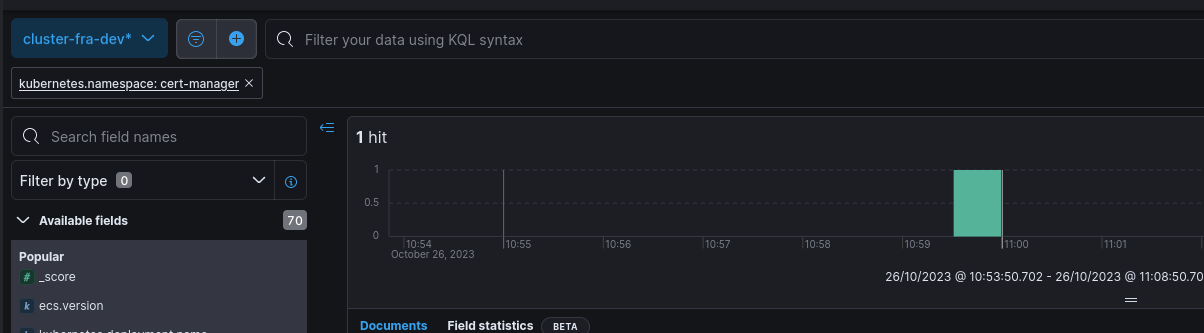
- Click on Inspect -> Request. Scroll down until you find JSON object with starting with
query. Copy this part of request.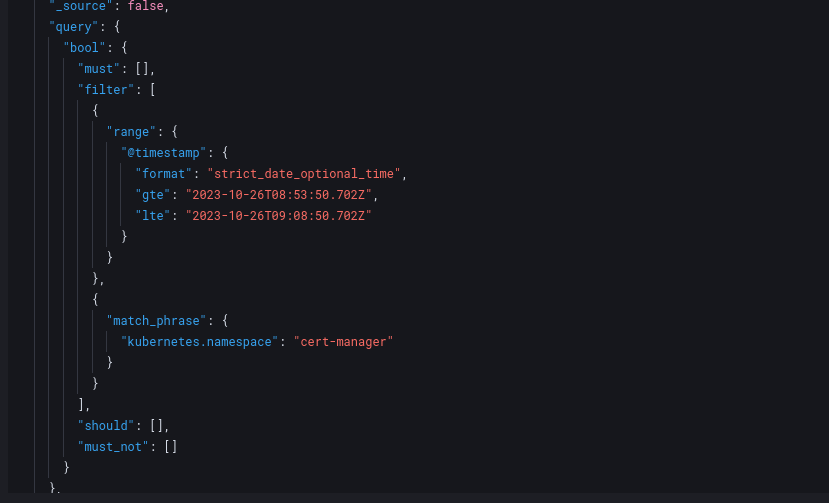
- Verify it returns expected documents by using Search API. Go to Dev Tools from panel and search for query using Search API.
For example:
On the response, you should see
GET /cluster-fra-dev/_search { "query": { "bool": { "must": [], "filter": [ { "range": { "@timestamp": { "format": "strict_date_optional_time", "gte": "2023-10-26T08:45:03.732Z", "lte": "2023-10-26T09:15:03.732Z" } } }, { "match_phrase": { "kubernetes.namespace": "cert-manager" } } ], "should": [], "must_not": [] } } }hitsand validate if it returns expected number of documents. It can showeqorgte-gteis estimation, whileeqis the true number of documents - Now that the query is verified, you can run it by Delete by Query API. It's good idea to run the job asynchronously with
wait_for_completion=falsequery parameter. For example:POST /cluster-fra-dev/_delete_by_query?wait_for_completion=false { "query": { "bool": { "must": [], "filter": [ { "range": { "@timestamp": { "format": "strict_date_optional_time", "gte": "2023-10-26T08:45:03.732Z", "lte": "2023-10-26T09:15:03.732Z" } } }, { "match_phrase": { "kubernetes.namespace": "cert-manager" } } ], "should": [], "must_not": [] } } } - Task is created, you can check the status by querying Task API with
GET /_tasks/<task_id>.