Landing Zone - Lesson 3
[[TOC]]
Prerequisites
- GCP project in LZ
- Terraform CLI installed - https://developer.hashicorp.com/terraform/install
Infrastructure as a code
Last lesson showed practical example of using Cloud Console to spin up infrastructure. Now, this works for exploration, but we have no peer review, CI pipelines and no versioning in place. One of main benefits of cloud infrastructure is that cloud providers gives you REST APIs to interact with infrastructure programmatically.
You can write custom application, which creates Pub/Sub topics, Cloud Scheduler jobs and more, however the industry already created products, focusing on this domain. The biggest and our recommended product is Terraform.
It is combination of CLI tool and declarative configuration language, that describes a desired state of your infrastructure. It will create, update or destroy infrastructure, depending on declared configuration.
Terraform crash-course
Typical local development Terraform workflow looks like this:
- You write infrastructure declaration using Terraform language (saving file with
.tf) - You run
terraform initto download Terraform modules / providers and initialize the state file backend - You run
terraform planto preview what would Terraform do to match desired infrastructure state (create/update/delete resources) - You review the plan to see if the changes are as expected
- You run
terraform apply. This will again show you what Terraform is planning to do with your infrastructure and waits forYesfrom you to confirm changes. After confirming, it will do the planned changes.
We will introduce more details as we go further with lesson. Now, let's prepare our Greeter infrastructure to be managed by Terraform.
Prepare access to automation project
In Lesson 1, we filled automation.yaml but we haven't interacted with it at all.
Now it's time to use it, as it is project dedicated for infrastructure state management of it's sibling svc.yaml project.
This is how we ended up with automation.yaml from Lesson 1:
# Project context with index (see RFC 6 - https://docs.google.com/document/d/1pGHTQeX2QfVxg1uSBVypl96NmCOTcsS3pqXXgidI9nQ/edit?tab=t.0#heading=h.sugbfwkb5933).
# Most of the time its Kubernetes namespace name, where application lives.
name: greeter-0
# Mandatory labels (see RFC 6 - https://docs.google.com/document/d/1pGHTQeX2QfVxg1uSBVypl96NmCOTcsS3pqXXgidI9nQ/edit?tab=t.0#heading=h.31brybhdwmgx)
labels:
  team: devops
  primarycontact: l_nagy # '.' is invalid character in label, so we use '_'
We extend it with new key iac like this:
name: greeter-0
labels:
  team: devops
  primarycontact: l_nagy
iac:
  apply: ["permtest@ftmo.com"] # Users that we allow to run Terraform
After merging the change permtest@ftmo.com will have access to create infrastructure in service project and store the state in automation project.
It is designed to be used with Terraform template repository, we provide on our Gitlab instance. Let's create it for our Greeter app infrastructure.
Spinning up infrastructure from Gitlab template repository
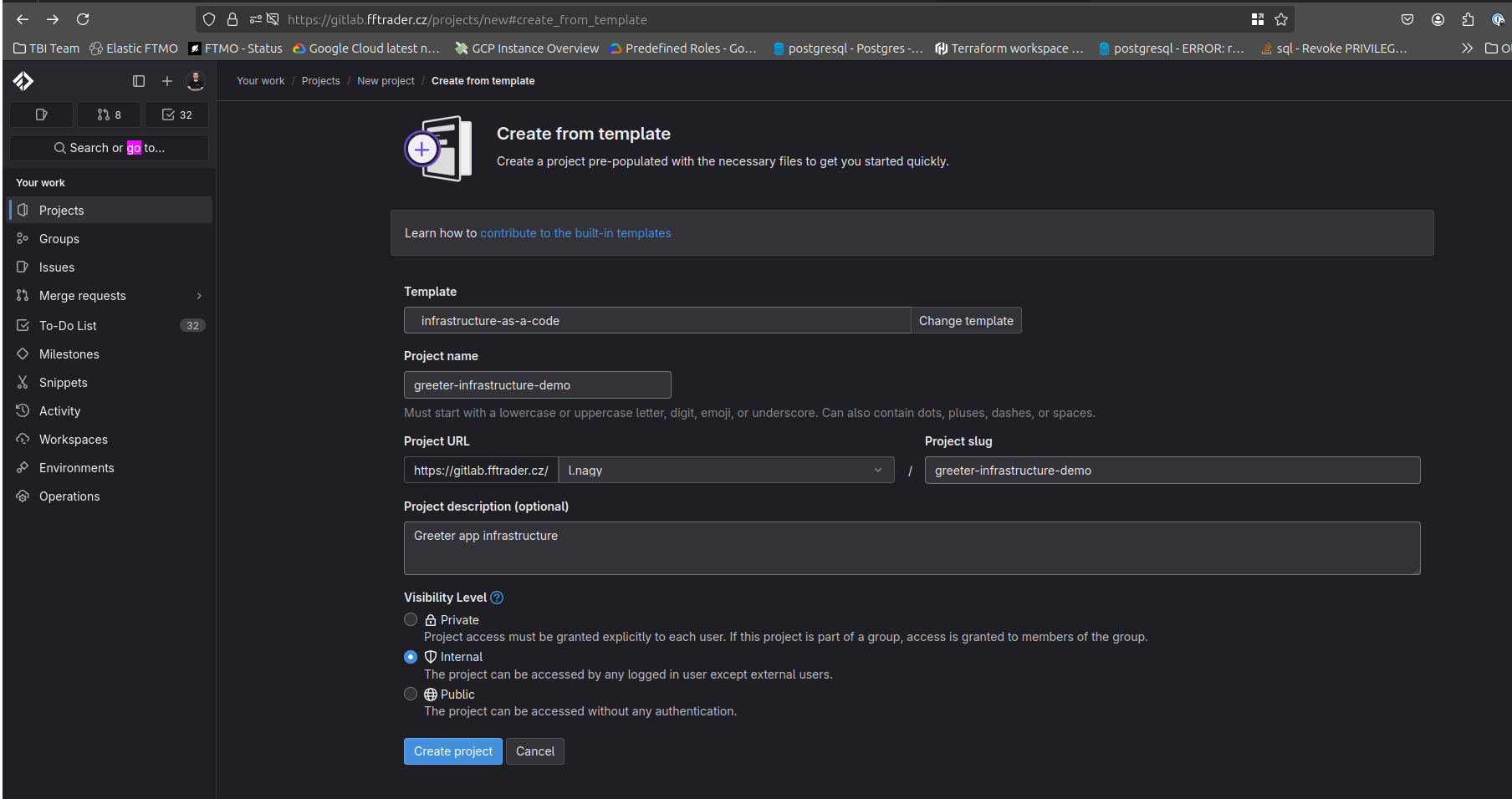
We will create greeter-infrastructure-demo repository from template like this:
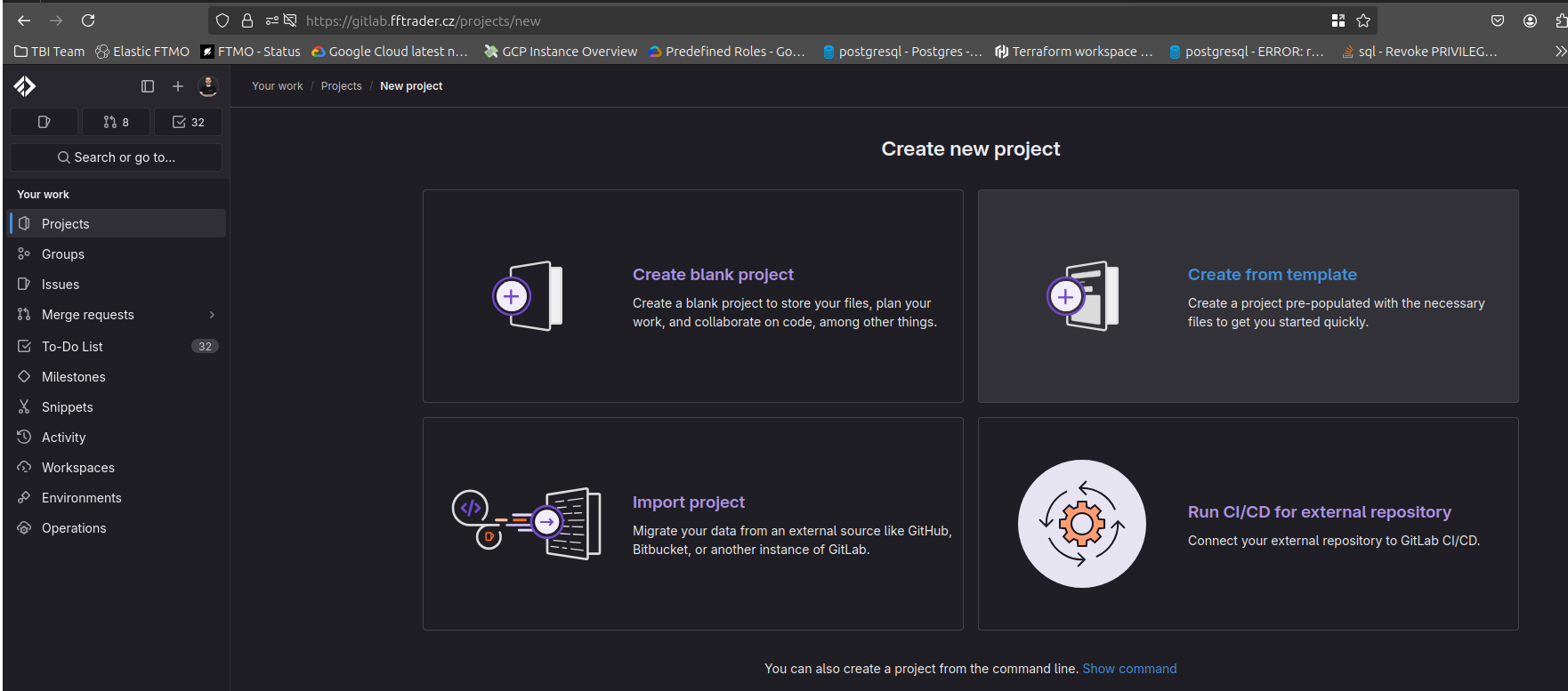
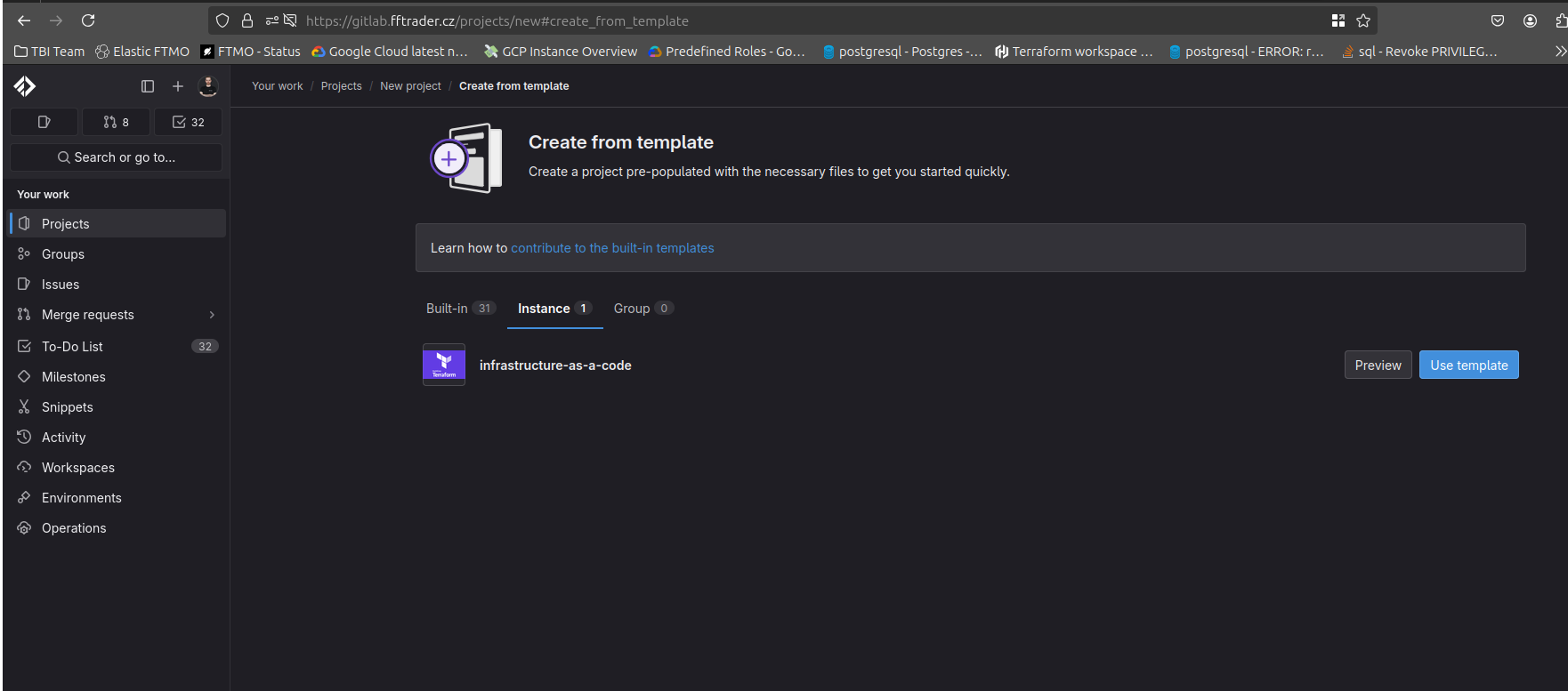
- Login to gitlab.fftrader.cz
- Select New Project -> Create from template -> Instance -> infrastructure-as-a-code (Use template).
- Create it in group / personal namespace where you can create repositories. After confirming, You will be redirected to newly created project.
1.  |
2.  |
3.  |
|---|---|---|
Overview of template
Template has 4 directories:
- dev
- stage
- prod
- modules
Directories with environment names hold infrastructure for respective environment and modules is a place for Terraform Modules - your own reusable blocks of Terraform code to spin up infrastructure.
In each environment folder, you will find terraform.tf. It contains basic Terraform state setup, which you need to modify for your needs - replacing Project IDs for service and automation project at their respective places.
Adding infrastructure for greeter app in terraform
We start with replicating infrastructure we created in web console, but this time, we use Terraform. We will:
- Setup Terraform state backend
- Create Pub/Sub topic and subscription
- Create Cloud Scheduler job, sending message to topic
- Set up IAM to allow Greeter app in Kubernetes to subscribe to Pub/Sub
Setup Terraform state backend
We start by modifying terraform.tf from the template repository. We replace the placeholder values to our GCP project values like this:
terraform {
  # This is section for setting up Terraform state
  backend "gcs" {
    bucket                      = "ftmo-cr-da-greeter-0-state" # ftmo-cr-da-greeter-0 is Project ID of automation project - Terraform state is there
    impersonate_service_account = "iac-apply@ftmo-cr-da-greeter-0.iam.gserviceaccount.com" # Project ID of automation project was filled here again - this time, it's used to identify the 'iac-apply' account that we impersonate during Terraform execution
  }

  # This section specifies which version of Terraform provider we expect.

  required_providers {
    google = {
      source  = "hashicorp/google"
      version = "~> 6.0" # For our example, we use Google provider in version >= 6.x < 7.x
    }
  }
}

# Configuration of provider. Almost every resource needs a project specified - if it's not, provider's project is used
provider "google" {
  project                     = "ftmo-cr-ds-greeter-0" # Project ID of service project - where we have the infrastructure
  impersonate_service_account = "iac-apply@ftmo-cr-da-greeter-0.iam.gserviceaccount.com" # What identity we impersonate to create resources with this provider
  user_project_override       = true # force usage of provider / Terraform project setup instead of detection of Quota project from API
  billing_project             = "ftmo-cr-ds-greeter-0" # in what project is API used - some resources need this to make sure we call correct project
}
Next, we verify that everything is correctly setup. First make sure you have your Application Default Credentials loaded with your Google account.
This is usually needed to do only once.
gcloud auth application-default login
gcloud auth application-default set-quota-project ftmo-cr-ds-greeter-0
To verify that state is correctly configured run this in the same folder as terraform.tf file:
terraform init

Initializing the backend...
Initializing provider plugins...
- Reusing previous version of hashicorp/google from the dependency lock file
- Using previously-installed hashicorp/google v6.18.1

Terraform has been successfully initialized!

You may now begin working with Terraform. Try running "terraform plan" to see
any changes that are required for your infrastructure. All Terraform commands
should now work.

If you ever set or change modules or backend configuration for Terraform,
rerun this command to reinitialize your working directory. If you forget, other
commands will detect it and remind you to do so if necessary.


terraform plan

No changes. Your infrastructure matches the configuration.

Terraform has compared your real infrastructure against your configuration and found no differences, so no changes are needed.
Create Pub/Sub topic and subscription
Next, we create a new file in dev directory called cronjobs.tf. During execution, Terraform doesn't care if everything is in 1 file or in multiple ones. All files just need to be in same folder.
For better organization, you can create Terraform files per logical part of infrastructure.
In cronjobs.tf we organize resources for our managed cron jobs. That means - Pub/Sub topics and subscriptions, Cloud Scheduler jobs and IAM policies on subscriptions.
Here is example of cronjobs.tf
# Resource definition
# google_pubsub_topic = provider resource name. We found it from provider documentation on registry.terraform.io - https://registry.terraform.io/providers/hashicorp/google/latest/docs/resources/pubsub_topic
# "greeter" resource identifier = resource instance. Must be unique with 1 Terraform state
resource "google_pubsub_topic" "greeter" {
  # from here, we fill attributes of resource - what is being passed to Google APIs
  name = "greeter" # Name of Pub/Sub topic
}

resource "google_pubsub_subscription" "greeter" {
  name  = "greeter-sub" # Name of Pub/Sub subscription
  # reference to existing topic in state. This makes implicit dependency between topic and subscription - if something changes in topic, subscription might be affected.
  # It also forces order of operation - first topic is created, after that subscription creation can proceed
  topic = google_pubsub_topic.greeter.id
}
Now, when we run terraform plan we will see something like this:
Click to reveal `terraform plan`
Terraform used the selected providers to generate the following execution plan. Resource actions are indicated with the following symbols:
  + create

Terraform will perform the following actions:

# google_pubsub_subscription.greeter will be created
+ resource "google_pubsub_subscription" "greeter" {
   + ack_deadline_seconds       = (known after apply)
   + effective_labels           = {
      + "goog-terraform-provisioned" = "true"
        }
   + id                         = (known after apply)
   + message_retention_duration = "604800s"
   + name                       = "greeter-sub"
   + project                    = "ftmo-cr-ds-greeter-0"
   + terraform_labels           = {
      + "goog-terraform-provisioned" = "true"
        }
   + topic                      = (known after apply)

   + expiration_policy (known after apply)
     }

# google_pubsub_topic.greeter will be created
+ resource "google_pubsub_topic" "greeter" {
   + effective_labels = {
      + "goog-terraform-provisioned" = "true"
        }
   + id               = (known after apply)
   + name             = "greeter"
   + project          = "ftmo-cr-ds-greeter-0"
   + terraform_labels = {
      + "goog-terraform-provisioned" = "true"
        }

   + message_storage_policy (known after apply)
     }

Plan: 2 to add, 0 to change, 0 to destroy.

Note: You didn't use the -out option to save this plan, so Terraform can't guarantee to take exactly these actions if you run "terraform
apply" now.
It shows the "plan" - dry run of what changes will happen on infrastructure. Some attributes will be autofilled ((known after apply)) - value is populated by Google API.
Some fields come from provider setting (project) and we also see our name attribute that we explicitly inserted. Notice topic attribute in google_pubsub_subscription.
We filled the attribute with reference to google_pubsub_topic and at the time of plan, it's not known yet, because we are creating the topic in same operation.
The most important line is the last one, where we see a summary of plan: Plan: 2 to add, 0 to change, 0 to destroy. This means that with this plan, we won't destroy anything only add 2 new resources.
We can now try terraform apply which runs the plan again, but wait for our confirmation before proceeding:
Click to reveal `terraform apply`
terraform apply

Terraform used the selected providers to generate the following execution plan. Resource actions are indicated with the following symbols:
  + create

Terraform will perform the following actions:

  # google_pubsub_subscription.greeter will be created
  + resource "google_pubsub_subscription" "greeter" {
      + ack_deadline_seconds       = (known after apply)
      + effective_labels           = {
          + "goog-terraform-provisioned" = "true"
        }
      + id                         = (known after apply)
      + message_retention_duration = "604800s"
      + name                       = "greeter-sub"
      + project                    = "ftmo-cr-ds-greeter-0"
      + terraform_labels           = {
          + "goog-terraform-provisioned" = "true"
        }
      + topic                      = (known after apply)

      + expiration_policy (known after apply)
    }

  # google_pubsub_topic.greeter will be created
  + resource "google_pubsub_topic" "greeter" {
      + effective_labels = {
          + "goog-terraform-provisioned" = "true"
        }
      + id               = (known after apply)
      + name             = "greeter"
      + project          = "ftmo-cr-ds-greeter-0"
      + terraform_labels = {
          + "goog-terraform-provisioned" = "true"
        }

      + message_storage_policy (known after apply)
    }

Plan: 2 to add, 0 to change, 0 to destroy.

Do you want to perform these actions?
  Terraform will perform the actions described above.
  Only 'yes' will be accepted to approve.

  Enter a value: yes

google_pubsub_topic.greeter: Creating...
google_pubsub_topic.greeter: Creation complete after 3s [id=projects/ftmo-cr-ds-greeter-0/topics/greeter]
google_pubsub_subscription.greeter: Creating...
google_pubsub_subscription.greeter: Creation complete after 6s [id=projects/ftmo-cr-ds-greeter-0/subscriptions/greeter-sub]
We review the plan again and see that is the same as before. After confirming with yes in few seconds, Terraform created plan resources in our service project.
To verify if no other changes are pending, we can run terraform plan again and see something like this:
terraform plan
google_pubsub_topic.greeter: Refreshing state... [id=projects/ftmo-cr-ds-greeter-0/topics/greeter]
google_pubsub_subscription.greeter: Refreshing state... [id=projects/ftmo-cr-ds-greeter-0/subscriptions/greeter-sub]

No changes. Your infrastructure matches the configuration.
Creating Cloud Scheduler jobs and IAM setup
For Cloud Scheduler jobs hello-australia and hello-europe we use google_cloud_scheduler_job resource like this:
Click to see `dev/cronjobs.tf`
# Available and required attributes for scheduler jobs -> https://registry.terraform.io/providers/hashicorp/google/latest/docs/resources/cloud_scheduler_job
resource "google_cloud_scheduler_job" "hello-australia" {
  name        = "hello-australia"
  description = "Say Hello to Australia"
  schedule    = "*/2 * * * *"
  region      = "europe-west3"

  pubsub_target {
    topic_name = google_pubsub_topic.greeter.id
    # Terraform provides also functions such as `base64encode()` or `jsonencode()`. More on that - https://developer.hashicorp.com/terraform/language/functions
    data       = base64encode(jsonencode({ message : "Hello Australia" }))
  }
}

resource "google_cloud_scheduler_job" "hello-europe" {
  name        = "hello-europe"
  description = "Say Hello to Europe"
  schedule    = "* * * * *"
  region      = "europe-west3"

  pubsub_target {
    topic_name = google_pubsub_topic.greeter.id
    data       = base64encode(jsonencode({ message : "Hello Europe" }))
  }
}
We go again with terraform plan and terraform apply to validate intended changes.
Now that we have Pub/Sub topics, Scheduler jobs in place, we can move to our final step and that's IAM setup. Recall that pulling from subscription from our Kubernetes app, we need to have Pub/Sub Subscriber role for our Kubernetes namespace. Last time we set it up through gcloud, but we can do the same with Terraform.
# *_iam_binding are **authoritative** for role.
resource "google_pubsub_subscription_iam_binding" "greeter-consumer" {
  members = [
    "principalSet://iam.googleapis.com/projects/412451610001/locations/global/workloadIdentityPools/devops-309909.svc.id.goog/namespace/greeter-dev"
  ]
  role         = "roles/pubsub.subscriber"
  subscription = google_pubsub_subscription.greeter.name
  project      = "ftmo-cr-ds-greeter-0"
}
Here is output of terraform apply
Click to reveal `terraform apply`
terraform apply
google_pubsub_topic.greeter: Refreshing state... [id=projects/ftmo-cr-ds-greeter-0/topics/greeter]
google_cloud_scheduler_job.hello-australia: Refreshing state... [id=projects/ftmo-cr-ds-greeter-0/locations/europe-west3/jobs/hello-australia]
google_cloud_scheduler_job.hello-europe: Refreshing state... [id=projects/ftmo-cr-ds-greeter-0/locations/europe-west3/jobs/hello-europe]
google_pubsub_subscription.greeter: Refreshing state... [id=projects/ftmo-cr-ds-greeter-0/subscriptions/greeter-sub]

Terraform used the selected providers to generate the following execution plan. Resource actions are indicated with the following symbols:
  + create

Terraform will perform the following actions:

  # google_pubsub_subscription_iam_binding.greeter-consumer will be created
  + resource "google_pubsub_subscription_iam_binding" "greeter-consumer" {
      + etag         = (known after apply)
      + id           = (known after apply)
      + members      = [
          + "principalSet://iam.googleapis.com/projects/412451610001/locations/global/workloadIdentityPools/devops-309909.svc.id.goog/namespace/greeter-dev",
        ]
      + project      = "ftmo-cr-ds-greeter-0"
      + role         = "roles/pubsub.subscriber"
      + subscription = "greeter-sub"
    }

Plan: 1 to add, 0 to change, 0 to destroy.

Do you want to perform these actions?
  Terraform will perform the actions described above.
  Only 'yes' will be accepted to approve.

  Enter a value: yes

google_pubsub_subscription_iam_binding.greeter-consumer: Creating...
google_pubsub_subscription_iam_binding.greeter-consumer: Creation complete after 6s [id=projects/ftmo-cr-ds-greeter-0/subscriptions/greeter-sub/roles/pubsub.subscriber]

Apply complete! Resources: 1 added, 0 changed, 0 destroyed.
As in gcloud command from Lesson 2, we use principalSet to identify all pods in namespace greeter-dev in devops-309909 project (where our Kubernetes clusters are).
Authoritative IAM binding
We used *_iam_binding resource type, which is authoritative for a role. Okay but what does it mean?
With this type of IAM setup, we give Terraform ownership over all members with this role over the resource. In practical terms, if we add same role on the resource again from different source (web console, different Terraform resource, gcloud) - Terraform will detect the drift and enforce what is written in code.
Let's see it in action:
terraform planreports no changes:terraform plan google_pubsub_topic.greeter: Refreshing state... [id=projects/ftmo-cr-ds-greeter-0/topics/greeter] google_pubsub_subscription.greeter: Refreshing state... [id=projects/ftmo-cr-ds-greeter-0/subscriptions/greeter-sub] google_cloud_scheduler_job.hello-europe: Refreshing state... [id=projects/ftmo-cr-ds-greeter-0/locations/europe-west3/jobs/hello-europe] google_cloud_scheduler_job.hello-australia: Refreshing state... [id=projects/ftmo-cr-ds-greeter-0/locations/europe-west3/jobs/hello-australia] google_pubsub_subscription_iam_binding.greeter-consumer: Refreshing state... [id=projects/ftmo-cr-ds-greeter-0/subscriptions/greeter-sub/roles/pubsub.subscriber] No changes. Your infrastructure matches the configuration. Terraform has compared your real infrastructure against your configuration and found no differences, so no changes are needed.- I add
l.nagy@ftmo.comwithroles/pubsub.subscriberto Pub/Sub subscriptiongreeter-sub - Now I run
terraform planagain and see this:terraform plan google_pubsub_topic.greeter: Refreshing state... [id=projects/ftmo-cr-ds-greeter-0/topics/greeter] google_cloud_scheduler_job.hello-europe: Refreshing state... [id=projects/ftmo-cr-ds-greeter-0/locations/europe-west3/jobs/hello-europe] google_cloud_scheduler_job.hello-australia: Refreshing state... [id=projects/ftmo-cr-ds-greeter-0/locations/europe-west3/jobs/hello-australia] google_pubsub_subscription.greeter: Refreshing state... [id=projects/ftmo-cr-ds-greeter-0/subscriptions/greeter-sub] google_pubsub_subscription_iam_binding.greeter-consumer: Refreshing state... [id=projects/ftmo-cr-ds-greeter-0/subscriptions/greeter-sub/roles/pubsub.subscriber] Terraform used the selected providers to generate the following execution plan. Resource actions are indicated with the following symbols: ~ update in-place Terraform will perform the following actions: # google_pubsub_subscription_iam_binding.greeter-consumer will be updated in-place ~ resource "google_pubsub_subscription_iam_binding" "greeter-consumer" { id = "projects/ftmo-cr-ds-greeter-0/subscriptions/greeter-sub/roles/pubsub.subscriber" ~ members = [ - "user:l.nagy@ftmo.com", # (1 unchanged element hidden) ] # (4 unchanged attributes hidden) } Plan: 0 to add, 1 to change, 0 to destroy.
After applying, the l.nagy@ftmo.com is removed from IAM policy. Infrastructure matches the desired state in Terraform.
Refactoring Terraform code
Terraform doesn't have a way to define functions, classes, etc. as regular programming language. We describe the state we want and how is achieved is abstracted from us.
However, there are still opportunities to prevent copy-pasting code and reuse some blocks.
Now our cronjobs.tf looks like this:
Click to expand `cronjobs.tf`
resource "google_pubsub_topic" "greeter" {
  name = "greeter"
}

resource "google_pubsub_subscription" "greeter" {
  name  = "greeter-sub"
  topic = google_pubsub_topic.greeter.id
}

resource "google_cloud_scheduler_job" "hello-australia" {
  name        = "hello-australia"
  description = "Say Hello to Australia"
  schedule    = "*/2 * * * *"
  region      = "europe-west3"

  pubsub_target {
    topic_name = google_pubsub_topic.greeter.id
    data       = base64encode(jsonencode({ message : "Hello Australia" }))
  }
}

resource "google_cloud_scheduler_job" "hello-europe" {
  name        = "hello-europe"
  description = "Say Hello to Europe"
  schedule    = "* * * * *"
  region      = "europe-west3"

  pubsub_target {
    topic_name = google_pubsub_topic.greeter.id
    data       = base64encode(jsonencode({ message : "Hello Europe" }))
  }
}

resource "google_pubsub_subscription_iam_binding" "greeter-consumer" {
  members = [
    "principalSet://iam.googleapis.com/projects/412451610001/locations/global/workloadIdentityPools/devops-309909.svc.id.goog/namespace/greeter-dev"
  ]
  role         = "roles/pubsub.subscriber"
  subscription = google_pubsub_subscription.greeter.name
  project      = "ftmo-cr-ds-greeter-0"
}
Local variables
Region and projects are used at multiple places in our infrastructure. Terraform has local block, which can be filled with local variables, usable in all files.
This is how we modify our code with local variables region ; svc_project ; automation_project
Click to expand `cronjobs.tf`
# local variables are defined here ; can be used in all files in current directory
locals {
  region             = "europe-west3"
  svc_project        = "ftmo-cr-ds-greeter-0"
  automation_project = "ftmo-cr-da-greeter-0"
}

resource "google_pubsub_topic" "greeter" {
  name = "greeter"
}

resource "google_pubsub_subscription" "greeter" {
  name  = "greeter-sub"
  topic = google_pubsub_topic.greeter.id
}

resource "google_cloud_scheduler_job" "hello-australia" {
  name        = "hello-australia"
  description = "Say Hello to Australia"
  schedule    = "*/2 * * * *"
  region      = local.region # reference of local variable with local.<variable_name>

  pubsub_target {
    topic_name = google_pubsub_topic.greeter.id
    data       = base64encode(jsonencode({ message : "Hello Australia" }))
  }
}

resource "google_cloud_scheduler_job" "hello-europe" {
  name        = "hello-europe"
  description = "Say Hello to Europe"
  schedule    = "* * * * *"
  region      = local.region # reference of local variable with local.<variable_name>

  pubsub_target {
    topic_name = google_pubsub_topic.greeter.id
    data       = base64encode(jsonencode({ message : "Hello Europe" }))
  }
}

resource "google_pubsub_subscription_iam_binding" "greeter-consumer" {
  members = [
    "principalSet://iam.googleapis.com/projects/412451610001/locations/global/workloadIdentityPools/devops-309909.svc.id.goog/namespace/greeter-dev"
  ]
  role         = "roles/pubsub.subscriber"
  subscription = google_pubsub_subscription.greeter.name
  project      = local.svc_project # reference of local variable with local.<variable_name>
}
Click to expand `terraform.tf`
terraform {
  # backend block **does not** support variables. It has to be static.
  backend "gcs" {
    bucket                      = "ftmo-cr-da-greeter-0-state"
    impersonate_service_account = "iac-apply@ftmo-cr-da-greeter-0.iam.gserviceaccount.com"
  }

  required_providers {
    google = {
      source  = "hashicorp/google"
      version = "~> 6.0"
    }
  }
}

provider "google" {
  project                     = local.svc_project # defined in cronjobs.tf but can be used here too
  impersonate_service_account = "iac-apply@${local.automation_project}.iam.gserviceaccount.com" # variable can be reference also inside string. Just wrap it in ${}. This works also for functions, etc...
  user_project_override       = true
  billing_project             = local.svc_project # defined in cronjobs.tf but can be used here too
}
We can validate that our changes did nothing to infrastructure by running terraform plan
Click to reveal `terraform plan`
terraform plan
google_pubsub_topic.greeter: Refreshing state... [id=projects/ftmo-cr-ds-greeter-0/topics/greeter]
google_cloud_scheduler_job.hello-europe: Refreshing state... [id=projects/ftmo-cr-ds-greeter-0/locations/europe-west3/jobs/hello-europe]
google_cloud_scheduler_job.hello-australia: Refreshing state... [id=projects/ftmo-cr-ds-greeter-0/locations/europe-west3/jobs/hello-australia]
google_pubsub_subscription.greeter: Refreshing state... [id=projects/ftmo-cr-ds-greeter-0/subscriptions/greeter-sub]
google_pubsub_subscription_iam_binding.greeter-consumer: Refreshing state... [id=projects/ftmo-cr-ds-greeter-0/subscriptions/greeter-sub/roles/pubsub.subscriber]

No changes. Your infrastructure matches the configuration.

Terraform has compared your real infrastructure against your configuration and found no differences, so no changes are needed.
Repeating resources - for_each
Our Scheduler jobs have almost the same attributes. They are different only in: - name - schedule - description - message
We can use for_each meta-argument of resource, that will create multiple instances of resource like this:
Click to reveal `cronjobs.tf` with _for_each_
locals {
  region             = "europe-west3"
  svc_project        = "ftmo-cr-ds-greeter-0"
  automation_project = "ftmo-cr-da-greeter-0"

  hello_jobs = { # map definition - holding values in key-value structure
    # Keys must be static and unique in map. Here it's 'australia' and 'europe'
    australia = {
      # 2 attributes in object - schedule and payload, we can reference it in resource
      schedule = "*/2 * * * *"
      payload = "Hello Australia"
    }
    europe = {
      schedule = "* * * * *"
      payload = "Hello Europe"
    }
  }
}

resource "google_pubsub_topic" "greeter" {
  name = "greeter"
}

resource "google_pubsub_subscription" "greeter" {
  name  = "greeter-sub"
  topic = google_pubsub_topic.greeter.id
}

# name of resource has changed, as it's no longer hello-australia only, but generic hello
resource "google_cloud_scheduler_job" "hello" {
  # meta-argument for_each - works only over map (and we have a map in local.hello_jobs)
  for_each = local.hello_jobs
  name        = "hello-${each.key}" # each.key is special value, referencing key of map in each iteration
  description = "Say Hello to ${title(each.key)}" # showcase of using title() function inline string over map key
  schedule    = each.value.schedule # each.value is special value, giving us access to value of key. In value we have object, so we can access it's parameter by the name 'schedule'
  region      = local.region

  pubsub_target {
    topic_name = google_pubsub_topic.greeter.id
    data       = base64encode(jsonencode({ message : each.value.payload })) # accessing payload value of each key in iteration
  }
}

resource "google_pubsub_subscription_iam_binding" "greeter-consumer" {
  members = [
    "principalSet://iam.googleapis.com/projects/412451610001/locations/global/workloadIdentityPools/devops-309909.svc.id.goog/namespace/greeter-dev"
  ]
  role         = "roles/pubsub.subscriber"
  subscription = google_pubsub_subscription.greeter.name
  project      = local.svc_project
}
When we run terraform plan...
Click to reveal `terraform plan`
terraform plan
google_pubsub_topic.greeter: Refreshing state... [id=projects/ftmo-cr-ds-greeter-0/topics/greeter]
google_cloud_scheduler_job.hello-europe: Refreshing state... [id=projects/ftmo-cr-ds-greeter-0/locations/europe-west3/jobs/hello-europe]
google_cloud_scheduler_job.hello-australia: Refreshing state... [id=projects/ftmo-cr-ds-greeter-0/locations/europe-west3/jobs/hello-australia]
google_pubsub_subscription.greeter: Refreshing state... [id=projects/ftmo-cr-ds-greeter-0/subscriptions/greeter-sub]
google_pubsub_subscription_iam_binding.greeter-consumer: Refreshing state... [id=projects/ftmo-cr-ds-greeter-0/subscriptions/greeter-sub/roles/pubsub.subscriber]

Terraform used the selected providers to generate the following execution plan. Resource actions are indicated with the following symbols:
+ create
- destroy

Terraform will perform the following actions:

# google_cloud_scheduler_job.hello["australia"] will be created
+ resource "google_cloud_scheduler_job" "hello" {
   + description = "Say Hello to Australia"
   + id          = (known after apply)
   + name        = "hello-australia"
   + paused      = (known after apply)
   + project     = "ftmo-cr-ds-greeter-0"
   + region      = "europe-west3"
   + schedule    = "*/2 * * * *"
   + state       = (known after apply)
   + time_zone   = "Etc/UTC"

   + pubsub_target {
      + data       = "eyJtZXNzYWdlIjoiSGVsbG8gQXVzdHJhbGlhIn0="
      + topic_name = "projects/ftmo-cr-ds-greeter-0/topics/greeter"
        }
        }

# google_cloud_scheduler_job.hello["europe"] will be created
+ resource "google_cloud_scheduler_job" "hello" {
   + description = "Say Hello to Europe"
   + id          = (known after apply)
   + name        = "hello-europe"
   + paused      = (known after apply)
   + project     = "ftmo-cr-ds-greeter-0"
   + region      = "europe-west3"
   + schedule    = "* * * * *"
   + state       = (known after apply)
   + time_zone   = "Etc/UTC"

   + pubsub_target {
      + data       = "eyJtZXNzYWdlIjoiSGVsbG8gRXVyb3BlIn0="
      + topic_name = "projects/ftmo-cr-ds-greeter-0/topics/greeter"
        }
        }

# google_cloud_scheduler_job.hello-australia will be destroyed
# (because google_cloud_scheduler_job.hello-australia is not in configuration)
- resource "google_cloud_scheduler_job" "hello-australia" {
   - description      = "Say Hello to Australia" -> null
   - id               = "projects/ftmo-cr-ds-greeter-0/locations/europe-west3/jobs/hello-australia" -> null
   - name             = "hello-australia" -> null
   - paused           = false -> null
   - project          = "ftmo-cr-ds-greeter-0" -> null
   - region           = "europe-west3" -> null
   - schedule         = "*/2 * * * *" -> null
   - state            = "ENABLED" -> null
   - time_zone        = "Etc/UTC" -> null
     # (1 unchanged attribute hidden)

   - pubsub_target {
      - attributes = {} -> null
      - data       = "eyJtZXNzYWdlIjoiSGVsbG8gQXVzdHJhbGlhIn0=" -> null
      - topic_name = "projects/ftmo-cr-ds-greeter-0/topics/greeter" -> null
        }
        }

# google_cloud_scheduler_job.hello-europe will be destroyed
# (because google_cloud_scheduler_job.hello-europe is not in configuration)
- resource "google_cloud_scheduler_job" "hello-europe" {
   - description      = "Say Hello to Europe" -> null
   - id               = "projects/ftmo-cr-ds-greeter-0/locations/europe-west3/jobs/hello-europe" -> null
   - name             = "hello-europe" -> null
   - paused           = false -> null
   - project          = "ftmo-cr-ds-greeter-0" -> null
   - region           = "europe-west3" -> null
   - schedule         = "* * * * *" -> null
   - state            = "ENABLED" -> null
   - time_zone        = "Etc/UTC" -> null
     # (1 unchanged attribute hidden)

   - pubsub_target {
      - attributes = {} -> null
      - data       = "eyJtZXNzYWdlIjoiSGVsbG8gRXVyb3BlIn0=" -> null
      - topic_name = "projects/ftmo-cr-ds-greeter-0/topics/greeter" -> null
        }
        }

Plan: 2 to add, 0 to change, 2 to destroy.
2 jobs are going to be destroyed and 2 created! That's because old resource name (google_cloud_scheduler_jobs.hello-europe) is no longer present in code but instead new is created (google_cloud_scheduler_jobs.hello["europe"]).
In this case, we don't mind the recreation, as it doesn't contain any useful data. However, resources such as databases, VMs can contain some state and on recreation you will lose it all! So you have to be careful what are you recreating.
For more graceful refactoring techniques, you can use moved blocks - more on that can be found here https://developer.hashicorp.com/terraform/language/moved
Output of terraform apply would look like this:
Click to reveal `terraform apply`
terraform apply
google_pubsub_topic.greeter: Refreshing state... [id=projects/ftmo-cr-ds-greeter-0/topics/greeter]
google_cloud_scheduler_job.hello-australia: Refreshing state... [id=projects/ftmo-cr-ds-greeter-0/locations/europe-west3/jobs/hello-australia]
google_cloud_scheduler_job.hello-europe: Refreshing state... [id=projects/ftmo-cr-ds-greeter-0/locations/europe-west3/jobs/hello-europe]
google_pubsub_subscription.greeter: Refreshing state... [id=projects/ftmo-cr-ds-greeter-0/subscriptions/greeter-sub]
google_pubsub_subscription_iam_binding.greeter-consumer: Refreshing state... [id=projects/ftmo-cr-ds-greeter-0/subscriptions/greeter-sub/roles/pubsub.subscriber]

Terraform used the selected providers to generate the following execution plan. Resource actions are indicated with the following symbols:
  + create
  - destroy

Terraform will perform the following actions:

  # google_cloud_scheduler_job.hello["australia"] will be created
  + resource "google_cloud_scheduler_job" "hello" {
      + description = "Say Hello to Australia"
      + id          = (known after apply)
      + name        = "hello-australia"
      + paused      = (known after apply)
      + project     = "ftmo-cr-ds-greeter-0"
      + region      = "europe-west3"
      + schedule    = "*/2 * * * *"
      + state       = (known after apply)
      + time_zone   = "Etc/UTC"

      + pubsub_target {
          + data       = "eyJtZXNzYWdlIjoiSGVsbG8gQXVzdHJhbGlhIn0="
          + topic_name = "projects/ftmo-cr-ds-greeter-0/topics/greeter"
        }
    }

  # google_cloud_scheduler_job.hello["europe"] will be created
  + resource "google_cloud_scheduler_job" "hello" {
      + description = "Say Hello to Europe"
      + id          = (known after apply)
      + name        = "hello-europe"
      + paused      = (known after apply)
      + project     = "ftmo-cr-ds-greeter-0"
      + region      = "europe-west3"
      + schedule    = "* * * * *"
      + state       = (known after apply)
      + time_zone   = "Etc/UTC"

      + pubsub_target {
          + data       = "eyJtZXNzYWdlIjoiSGVsbG8gRXVyb3BlIn0="
          + topic_name = "projects/ftmo-cr-ds-greeter-0/topics/greeter"
        }
    }

  # google_cloud_scheduler_job.hello-australia will be destroyed
  # (because google_cloud_scheduler_job.hello-australia is not in configuration)
  - resource "google_cloud_scheduler_job" "hello-australia" {
      - description      = "Say Hello to Australia" -> null
      - id               = "projects/ftmo-cr-ds-greeter-0/locations/europe-west3/jobs/hello-australia" -> null
      - name             = "hello-australia" -> null
      - paused           = false -> null
      - project          = "ftmo-cr-ds-greeter-0" -> null
      - region           = "europe-west3" -> null
      - schedule         = "*/2 * * * *" -> null
      - state            = "ENABLED" -> null
      - time_zone        = "Etc/UTC" -> null
        # (1 unchanged attribute hidden)

      - pubsub_target {
          - attributes = {} -> null
          - data       = "eyJtZXNzYWdlIjoiSGVsbG8gQXVzdHJhbGlhIn0=" -> null
          - topic_name = "projects/ftmo-cr-ds-greeter-0/topics/greeter" -> null
        }
    }

  # google_cloud_scheduler_job.hello-europe will be destroyed
  # (because google_cloud_scheduler_job.hello-europe is not in configuration)
  - resource "google_cloud_scheduler_job" "hello-europe" {
      - description      = "Say Hello to Europe" -> null
      - id               = "projects/ftmo-cr-ds-greeter-0/locations/europe-west3/jobs/hello-europe" -> null
      - name             = "hello-europe" -> null
      - paused           = false -> null
      - project          = "ftmo-cr-ds-greeter-0" -> null
      - region           = "europe-west3" -> null
      - schedule         = "* * * * *" -> null
      - state            = "ENABLED" -> null
      - time_zone        = "Etc/UTC" -> null
        # (1 unchanged attribute hidden)

      - pubsub_target {
          - attributes = {} -> null
          - data       = "eyJtZXNzYWdlIjoiSGVsbG8gRXVyb3BlIn0=" -> null
          - topic_name = "projects/ftmo-cr-ds-greeter-0/topics/greeter" -> null
        }
    }

Plan: 2 to add, 0 to change, 2 to destroy.

Do you want to perform these actions?
  Terraform will perform the actions described above.
  Only 'yes' will be accepted to approve.

  Enter a value: yes

google_cloud_scheduler_job.hello-europe: Destroying... [id=projects/ftmo-cr-ds-greeter-0/locations/europe-west3/jobs/hello-europe]
google_cloud_scheduler_job.hello-australia: Destroying... [id=projects/ftmo-cr-ds-greeter-0/locations/europe-west3/jobs/hello-australia]
google_cloud_scheduler_job.hello["europe"]: Creating...
google_cloud_scheduler_job.hello["australia"]: Creating...
google_cloud_scheduler_job.hello-australia: Destruction complete after 3s
google_cloud_scheduler_job.hello["australia"]: Creation complete after 5s [id=projects/ftmo-cr-ds-greeter-0/locations/europe-west3/jobs/hello-australia]
google_cloud_scheduler_job.hello-europe: Destruction complete after 5s
google_cloud_scheduler_job.hello["europe"]: Still creating... [10s elapsed]
google_cloud_scheduler_job.hello["europe"]: Creation complete after 13s [id=projects/ftmo-cr-ds-greeter-0/locations/europe-west3/jobs/hello-europe]

Apply complete! Resources: 2 added, 0 changed, 2 destroyed.
Modules
We extracted hardcoded values to local variables and reduced repetition in scheduler job. The infrastructure works - our cronjobs.tf can be considered as end-to-end package to send messages at intervals.
But what if we want to use same logic in different environment? We would need to copy-paste the cronjobs.tf to every environment folder and override values environment specific values.
Terraform has modules, which tries to solve the issue. You can define module that encapsulate logical component and pass it input variables to modify environment specific values.
We will create generic managed-cronjob module usable in multiple environments. It will accept cron-job definition and which Kubernetes namespaces should have access to consume the messages. The module will be in modules directory in template repository.
Structure looks like this:
modules/
└── cronjob # Name of module
    ├── main.tf # Main code, creating needed resources
    ├── outputs.tf # outputs, exposed to caller for further use
    ├── README.md
    └── variables.tf # input variables, configuring the module
variables.tf. It defines input parameters, which can be later reference in code, similar to local variables.
Click to reveal `modules/cronjob/variables.tf`
variable "cronjob" {
  type = object({ # composite type of variable ; can specify what we expect and fail when we pass incorrect variables
    name        = string
    payload     = string
    schedule    = string
    description = optional(string, "")
    consumers = object({
      k8s_namespaces = list(string)
    })
  })
  description = "Cloud Scheduler cron job definition with consumers. Sends messages in JSON {'message':<payload>}"
}

variable "region" {
  type        = string
  default     = "europe-west3" # It also support default values, if not passed it
  description = "Where are the resources located"
}

variable "svc_project" {
  type        = string # simple required variable
  description = "Service GCP Project ID where cronjobs are created"
}
Our main.tf looks almost same as cronjobs.tf
Click to reveal `modules/cronjob/main.tf`
locals {
  # we save this static string as local variable, for better readability
  k8s_namespace_iam_principal = "principalSet://iam.googleapis.com/projects/412451610001/locations/global/workloadIdentityPools/devops-309909.svc.id.goog/namespace"
}

resource "google_pubsub_topic" "cron_target" {
  name    = "${var.cronjob.name}-scheduler" # referencing name from variable `cronjob` and it's attribute `name`
  project = var.svc_project # value of variable svc_project passed from caller
}

resource "google_pubsub_subscription" "cron_target" {
  name    = "${var.cronjob.name}-scheduler-sub"
  topic   = google_pubsub_topic.cron_target.id
  project = var.svc_project

}

resource "google_cloud_scheduler_job" "job" {
  name        = var.cronjob.name
  description = var.cronjob.description
  schedule    = var.cronjob.schedule

  region  = var.region
  project = var.svc_project

  pubsub_target {
    topic_name = google_pubsub_topic.cron_target.id
    data       = base64encode(jsonencode({ message : var.cronjob.payload }))
  }
}

resource "google_pubsub_subscription_iam_binding" "cron_k8s_consumers" {
  # distinct() makes sure that duplicates are removed
  members = distinct(
    # List comprehension, which takes every element from cronjob.consumer.k8s_namespaces list and does `format()` operation over the value, producting list with formatted values
    [for namespace in var.cronjob.consumers.k8s_namespaces : format("%s/%s", local.k8s_namespace_iam_principal, namespace)]
  )
  role         = "roles/pubsub.subscriber"
  subscription = google_pubsub_subscription.cron_target.id
  project      = var.svc_project
}
And this is how we call the module from dev/ folder in cronjobs.tf
Click to reveal `dev/cronjobs.tf`
locals {
  svc_project        = "ftmo-cr-ds-greeter-0"
  automation_project = "ftmo-cr-da-greeter-0"
  jobs = { # multiple jobs definition
    australia = {
      name     = "hello-australia"
      payload  = "Hello Australia"
      schedule = "*/2 * * * *"
      consumers = {
        k8s_namespaces = ["greeter-dev", "go-example"]
      }
    }
    europe = {
      name     = "hello-europe"
      payload  = "Hello Australia"
      schedule = "* * * * *"
      consumers = {
        k8s_namespaces = ["greeter-dev"]
      }
    }
  }
}

module "cronjobs" {
  for_each    = local.jobs
  source      = "../modules/cronjob"
  cronjob     = each.value
  svc_project = local.svc_project
}
Deploying Terraform via CI/CD
We are happy with our code, but all the changes were done locally. Template repository has already CI/CD pipeline included, we just need to do small modifications.
In dev/ folder, we open .gitlab-ci.yml and fill our automation project id on placeholder value <automation_project_id>.
It will look like this:
# ... redacted ...
build-dev:
  variables:
    TF_ROOT: dev  # The relative path to the root directory of the Terraform project
    TF_STATE_NAME: dev
    SERVICE_ACCOUNT: "cicd-iac-apply@ftmo-cr-da-greeter-0.iam.gserviceaccount.com" # replaced <automation_project_id> with real automation_project_id
  extends: .build
# ... redacted ...
iac.apply array as we configured at start.
This is how typical pipeline looks like on feature branches / merge requests.
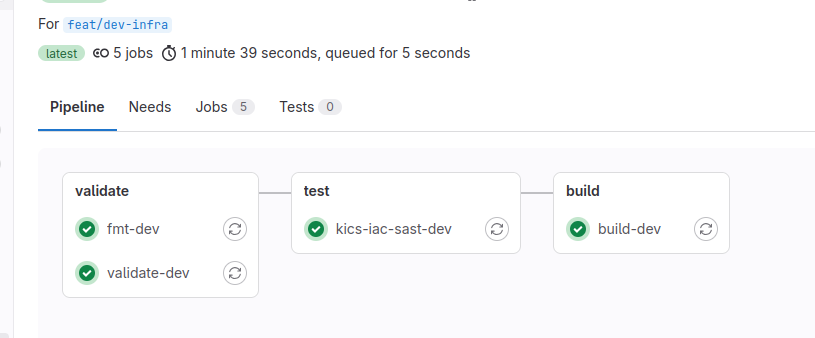
In validate phase it runs 2 Terraform commands, we haven't encountered yet:
- terraform fmt - formats the files in canonical format. In the pipeline it reports failure when not all files are formatted.
- terraform validate - does static syntax checking, without connecting to any remote services.
In test Gitlab built-in Infrastructure as Code Scanning is triggered. It will report you issues with your Terraform code in JSON format as part of artifacts
In build phase, terraform plan is executed. By the end, you will see what changes would be applied in next stage.
deploy stage is available only on main branch. It runs terraform apply based on plan in build phase and requires no further approval. It requires manual trigger, so make sure you read the plan from previous stage!